
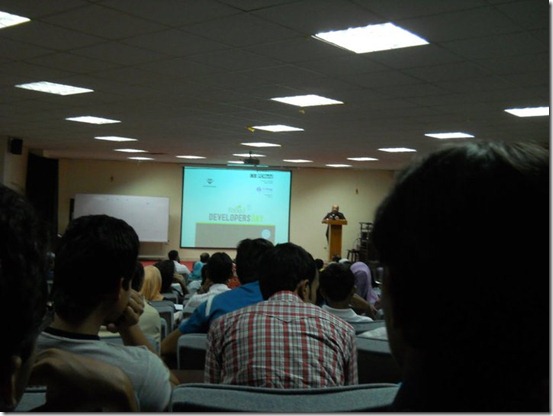
After having a terrible appendix operation and a bed rest for continuous 20 days I was out of touch with everything I was addicted to i.e Blogging and extra curricular activities. And just when I got better I restarted tasting the beautiful flavors of life. On 16th March 2011, I attended a “Developer’s Day” event organized by ACM-NUCES FAST University Karachi. The event consisted of IT professionals, active and talented techy students from around the city. The event had many competitions in which one could participate and I chose the “
10 Minutes Tech Talk”. Each participant was given 10 minutes to share his brilliant tech idea with the audience and that idea was to be extra ordinary and unique enough so that it could impress the judges from software house companies.
The Start of the Day
The day turned out more interesting yet funny than I expected. I was informed just the day before the event (15th March) that I must take part in the competition. I was tired and physically week due to my recent appendix operation and had no intention of taking part in it. Some friends insisted and they took me to the event early in the morning. I was un prepared with no power point presentation slides, no notes and no nothing. I sat almost for three hours scratching my head and looking at presentations given by some extremely talented computer engineering students. But as the event continued I managed to prepare my presentation and the topic I chose as the “IDEA” was BLOGGING :p I was almost prepared and just needed a laptop so that I could display my blog on the projector instead of any power point slides. It took me a further one hour fighting with laptop and USB bugs but then finally I somehow managed to made up my mind and was ready to give it a shot!
I started the presentation with formal greetings and then a series of interactive questions from the audience. I saw a healthy participation from all corners. I described the term “Blog” and “Blogger” and paid more focus on why should One Blog? After having shared how much have blogging helped me till now to build up a happy online livelihood and how it has helped me with my day to day expenses, university costs and gym and studies, I saw people getting more and more engaged in the topic. But then during the presentation since I was unprepared and all spontaneous, I accidently slipped off few statements on some students who presented before me and the IT professionals and these statements were unfortunately taken as criticism. My point was that students often work hard day and night to become good gentlemen. They work hard at academic levels so that they could get good jobs in future. They always live up with this growing job tension in mind and often become patients of hopelessness, frustration and depression. I encouraged the students that everyone of them is a genius and if they apply their talents wisely by blogging for instance then they will have a life time happy investment, whose revenue size will keep on multiplying and will never die. I emphasized that a Blogger is self dependent and fully financially stable and does never have to worry about whether someone hires him as an employee or not because he has his own ever expanding and flourishing Company (Traffic and i.e Revenue)!. I termed some former ideas as manipulated carried forward copy cat adopted ideas and this was what that provoked half the audience and then it was poor me and the angry audience. I personally realized that I should have been a bit softer in my tone but at least I learnt that it is really important to come Prepared when you face a huge crowd.
My Achievement?
No matter what happened in the end but I really enjoyed the entire day. It was interesting, funny but a great learning experience. I did succeed in receiving some great motivating feedback from my university mates and from other students and the best part was that just after the presentation “
I received a JOB offer from jeemsolutions!” and that's what I termed as the biggest applause! :)
Event Photos
I know after the Appendix operation I look skinny so please don’t comment on my looks =d



Last words:
What I did that day was to show my love for Blogger and the beautiful art of Blogging. Blogging by every definition is the rapidly expanding internet phenomena that is revolving everywhere. Its all about sharing and learning. It has helped thousands of people with a happy, friendly, social, multicultural, academic and fun life. For Bloggers Blogosphere is their only virtual world where they feel at peace, where you find nothing but love, respect and honour. Forever do we Blog and forever will we Blog! Peace out! :)


 Mohammad
3/29/2011
Blogging tips
,
SEO
,
Traffic Tips
,
Webmaster Tools
Mohammad
3/29/2011
Blogging tips
,
SEO
,
Traffic Tips
,
Webmaster Tools
 After having shared
  You might have recently observed that I have integrated Adsense ads just between my posts and I choose those locations manually. This helps to keep my content neat and clean and as well as serve my revenue aims. To add adsense first you need to create a Ad unit using your Adsense Account and I just hope you guys know how to do that. If you don’t then don’t worry follow the steps below,
 Favicon is actually the icon that appears next to your Website URL in the browser address bar. A favicon is usually your blog logo. There are many free services that help to create favicons for you but most of these services use still images. I have used an animated favicon for my blog as you can see in your address bar. It actually consists of a logo and then my blog title as text. The image and text together makes a more beautiful combination. So lets jump at the tutorial and create an attractive cute favicon for your blog,
 Blogger has been the revolutionary engine in bringing a mega change in which data is written, shared and circulated online for pure educational and entertaining purposes. With every year passing this great company is coming up with brilliant new features that is taking it closer to premium blogger platforms
  After having shared all tips, tricks and tweaks to let you better optimize your Blogger based blogs, its time now to share my favorite SEO Tools without which Search Engine Optimization is all boring. These are my ultimate tools for understanding my competitors strategies. There are a lot of tools found online but you need just a single source that may provide you with everything you need. Rapid Searchmetrics is a website that has all what a webmaster needs. From free to premium services, they make your job simply fun. I enjoy using them a lot and always keep track of my CSS, Java, Image Size limits using these tools. It has always helped me keep track of my load time and internal and external link building. I just hope you find it worth trying and using.
 The next step towards better optimizing your Blogger blogs is to understand that several works are incomplete and Blogger has left its codes open for all to develop them. Thus thanks to some programmers and SEO’s most of Blogger bugs have been solved recently. One problem in default blogger templates is that your meta description appears below all your Post titles instead of Post description in search results. This badly effects your overall search rankings as same description that you have set for your homepage appears below all your posts. To address this issue I will jump straight on the solution.
 One of the most important thing that you must do after you have started optimizing your blogger based blog is to understand the loop holes of Blogger that really slows down your Traffic increase rate. One such loop hole is that during search listings you must have observed that your Blog homepage title appears before every single post that you publish. Since Google displays the first 66 characters thus due to unnecessary occurrence of the blog title causes important keywords of post titles to get chopped off. A screen shot below would be helpful,
