
 We have shared an introduction to info-graphics sometime back. Today, we will have a better understanding about creating an info-graphics; answering queries like why is it difficult? What makes an info-graphic? What are the popular and professional tools available and what do people say about it. Are you ready for this mix plate? What are we waiting then? Follow up
Why is info-graphic difficult?
Info-graphic is a not an easy discipline. Every blogger can’t represent his/her content in graphical form no matter how good he/she is at writing and designing. What are the obstacles in their way? Why is info-graphic more challenging? Because
- It takes a lot of time to design a really competent info-graphic.
- Proper organization and representation of data is tricky.
- Font size is not user friendly. Readers have to zoom in, mostly, to read the text written.
- Color blind people would not be able to grab the essence. You should think about them.
- Optimizing it for search engines is not well understood, yet.
Creating an info-graphic:
If you think you are ready to face all the above mentioned difficulties, then it is the right time to dive deeper into this topic and let’s find out the basic considerations for creating an info-graphic.
1-Division of Content:
You can divide your content into larger domains like color scheme, information and conclusions or results. Your content may not only contain facts but the statistical data as well. You may need to add some references or notes there as well. You are supposed to work them separately as we will explain soon. Textual content is used to support the visuals.
2-Diagramatic Flow:
Just as in our text based articles we figure out the flow of information and take aid of headings, sub-headings ; you need determine how you are going to connect the things. You may take help of flowcharts or mind maps to ease your task. Split up complex information in small chunks and then design smooth connectivity between them. You may make use of arrows or other symbols to simplify the process. We repeat, smooth connectivity; no jumps please.
3-Color Scheme:
Here comes the fun part; devise a color scheme. Since, you will be displaying many segments of information in your work; so it is recommended to select different colors for each portion. But remember one thing; do not confuse reader with absurd combination. Your color scheme should act like connecting his/her thoughts perceiving what you are conveying. Most of the info-graphics, I have come across, have disappointed me. Because they use too dark colors with a font size of 10! It seems to be a burden on eyesight.
4-Graphics:
This part consists of two types of graphics:
1- Theme Graphics 2-Referenced Graphics
Theme graphics will be the basic theme or the background .It gives an instant impression and information about what you are going to talk about and captivates the mind of reader. After that, we use different widely known icons to compress lengthy text in a simple image. For example, facebook like Google plus icon, twitter bird etc. These are known as referenced graphics and make it really helpful to convey more info at little space. Space is of course crucial in info-graphics.
1- Theme Graphics 2-Referenced Graphics
Theme graphics will be the basic theme or the background .It gives an instant impression and information about what you are going to talk about and captivates the mind of reader. After that, we use different widely known icons to compress lengthy text in a simple image. For example, facebook like Google plus icon, twitter bird etc. These are known as referenced graphics and make it really helpful to convey more info at little space. Space is of course crucial in info-graphics.
5-Research and Conclusions:
Now, this is the last point but equally important one. Info-graphics are mostly composed of large data sets which represent information about certain trends in the society or market. The data that is put into the graphics should be reliable and must comprise of useful information. It is analyzed to make a conclusion or a prediction. These conclusions are made at the bottom for vertical graphics whereas at the right side in horizontal.
Tools Used:
We have searched out and presenting you the most popular tools used for creating info-graphics.
Google Public Data:
It is not a complete designing tool but is used to gather information. It allows you to visualize, analyze and compare large sets of data in the form of line chart, bubble chart, bar chart or map chart.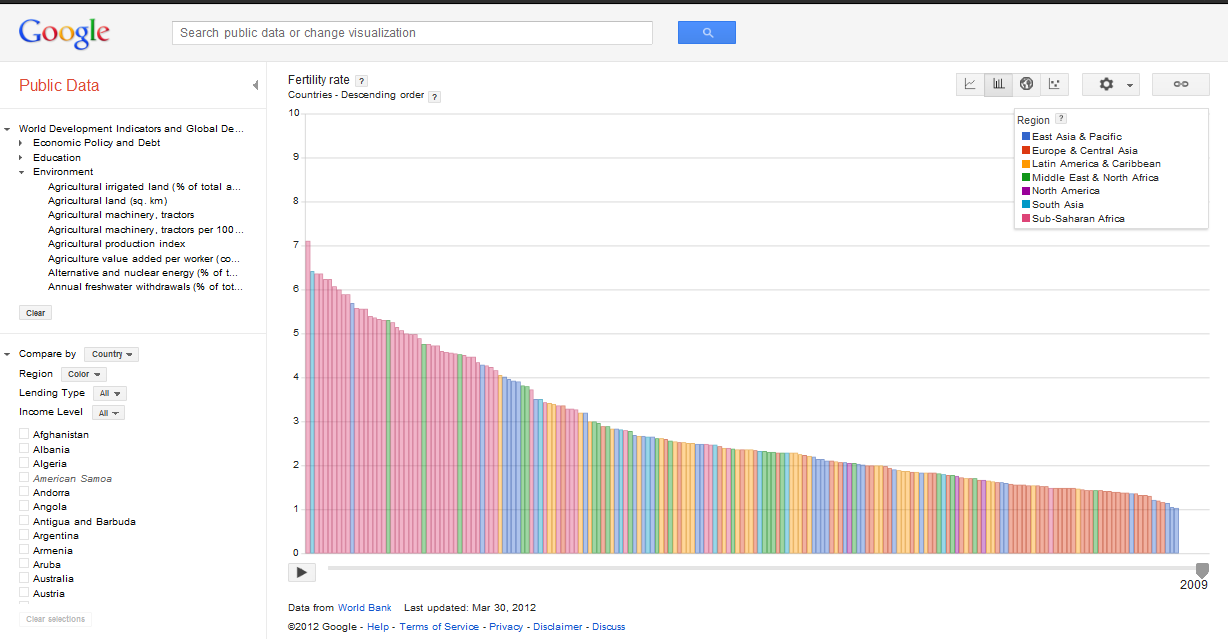
Creately Desktop Application:
The company advertises its product as:
Creately is a diagramming app that allows you to create Flowcharts, Mind Maps, UML, Database diagrams, Mockups or just about anything visual and collaborate with others right from your desktop.
It has a commercial license but is an essential for your info-graphic. The dominant feature is that it is a cross platform desktop application and facilitates with a variety of built-in templates. If you are working in a team; you can share your work and communicate with each other by signing up to Creately.
Creately is a diagramming app that allows you to create Flowcharts, Mind Maps, UML, Database diagrams, Mockups or just about anything visual and collaborate with others right from your desktop.
It has a commercial license but is an essential for your info-graphic. The dominant feature is that it is a cross platform desktop application and facilitates with a variety of built-in templates. If you are working in a team; you can share your work and communicate with each other by signing up to Creately.
Inkscape Application:
It is an open source vector graphics editing application that is similar to Xara X, CorelDraw, and illustrator. It follows W3C standard SVG (scalable vector graphics) file format. It does not support animations but provides several hi-tech features. It supports text as well and offers several tools for object manipulation as paths, spirals, 3D boxes, text, clones, rectangles and other style attributes etc. It is focused at Mac users but Unix and windows users can make use of it by integrating it with GTK+ toolkit. Are you willing to give inkscape a try?
Hohli and Wordle:
 Wordle has come up with a unique idea of converting text into “word clouds”, giving greater prominence to frequently occurring words. You can then change the font size, style and color schemes. On the other hand, Hohli is a chart builder, based on Google Charts API and the good news is; its freeware.
Others:
Some other freeware are also available with eye catching features. Since they are free that’s why we feel it important to inform you about them. These include Many Eyes, Stat Silk, Aviary Phoenix.
Many Eyes is a free data tool that enables the entire internet community to upload data and visualize it. You can also share this visualization with the option provided there. Statsilk has a number of tools available to create interactive maps, charts and graphs. Aviary phoenix also provides solution for image editing; compatible with web and mobile.
Many Eyes is a free data tool that enables the entire internet community to upload data and visualize it. You can also share this visualization with the option provided there. Statsilk has a number of tools available to create interactive maps, charts and graphs. Aviary phoenix also provides solution for image editing; compatible with web and mobile.
Argument:
This was all about so called “info-graphics”. But, people have got some anger and some objections stating that this term is widely misused. Since I am not an artist myself so I can’t pass any judgment but I feel it important to raise their voice here. According to them “Info-graphic is an abstract visualization used for short explanations like diagrams, charts and maps; whereas, info-posters are used to convey a variety of messages and display many facts in segments”.
Another school of thought is of the opinion that a graphics is simply a graphics and they argue that “Would you call a video which conveys information as info-video?”They think it as a stupid idea.
Another school of thought is of the opinion that a graphics is simply a graphics and they argue that “Would you call a video which conveys information as info-video?”They think it as a stupid idea.
Your Time to Say:
We have said a lot, trying to make it easy-understandable and at the same time armoring you with the fundamentals required before you jump into this category. Have we been able to do our job rightly? Criticize us; we welcome you.
Stay Blessed!
Stay Blessed!
See the following info graphic that describes how a blogger thinks and works. :)
INFOGRAPHIC CREDITS: Brain of a Blogger by Infolinks Ad service

Guest post by Rahmeen Ahmad Khan. She is MBT"s Gold Star Contributor. She is a tech savvy person who loves writing on technology and enjoys finding simple solutions to tech problems.


If you don't want to get yourself into Serious Technical Trouble while editing your Blog Template then just sit back and relax and let us do the Job for you at a fairly reasonable cost. Submit your order details by Clicking Here »
 Mohammad
5/03/2012
Blogging tips
,
Guest Posts
,
Web Designing
Mohammad
5/03/2012
Blogging tips
,
Guest Posts
,
Web Designing
