

Facebook Timeline is every where and new and interesting tweaks related to Timeline Layout customization are emerging. Yesterday we shared how you can create Cover Designs for your Timeline Profile and today we will learn new features added to Timeline and some customization tips and tricks. Understanding the new options and layout can be fun with Video illustration. The video tutorial will give you a great idea on how to change the default settings and make necessary security settings. But first lets learn some important tips.
1. 7 day Review Period
Facebook gives you a seven day period to customize your Timeline after which it will be set live and everyone will be able to see your new profile. If you didn't arranged your photos, videos and posts in timeline within this period then it will be setup automatically after 7 days.
2. View How Your Timeline Appears to others
To see how your Timeline appears to your friends then click on the gear menu at the top and choose "View As". You can choose how it appears to everyone/public or to any specific selected friend.


3. Set Your Posts Private
You can also hide or show individual posts. If you think you don't want a particular post to be shown then simply click the button just below your name and choose "Only Me". This will not delete the post but will be invisible to your friends and visible to you.
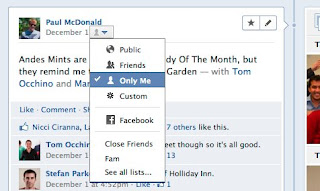

4. Feature or hide stories
There are some memorable posts or photos that you would always want to set as feature post. Timeline gives you the option of featuring your best moments and also lets you to choose who may view it. You can also hide some posts that you don't want others to see.
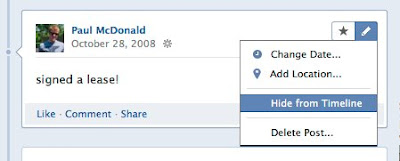
To feature something simply roll over your mouse cursor over that story and click the star that appears. This will expand the post into a wide two Colum view. You click the pencil next to star to even Hide that post from your Timeline

5. See everything with Activity Log!

6. Create a Timeline Cover
 You can create and design amazing Cover photos and add them to your timeline. Cover is the wide photo featured at the top of your profile which everyone can see. Please check the following post for amazing ways of making a Hot Cover Design for your profile!
Video Tutorial
This is official tutorial by Facebook. I am sure you the video would better demonstrate the features that I have missed. Timeline is fun as opposed to what I thought previously. Enjoy the new Profile. Have fun pals! :)If you liked what we shared then please share it with your friends on Facebook and let everyone explore new exciting tweaks!
I am sure you will be interested in our previous stories on timeline:


If you don't want to get yourself into Serious Technical Trouble while editing your Blog Template then just sit back and relax and let us do the Job for you at a fairly reasonable cost. Submit your order details by Clicking Here »
 Mohammad
12/18/2011
Facebook tricks
,
Social Media
Mohammad
12/18/2011
Facebook tricks
,
Social Media

Bro.........I need Ur help. I have been avid reader of ur site and infact Ur blog is the backbone of mah one. But bro i encountered a problom regarding the READ MORE button.
ReplyDeleteActually everything was fine and i never even touched the HTML after adding the Read more button on mah site. But bro it worked fine for almost 5-6 months but since last 3 posts i've been encountering a problom.
The read more button is showing up all right but only after the whole post.
plz help me out bro.
mah site is www.hackingmyworld.blogspot.com u can check out urself ! plz bro help me
hey bro.........thnx !! i was able to solve the problem. As soon as i posted mah problom here i struck and idea and it really helped.
ReplyDeleteur site is really lucky for me bro thnx again.
Hello, if your readers want to have a creative timeline cover page, I made a free template. Here it is:
ReplyDeletehttp://www.designrshub.com/2011/12/free-facebook-timeline-cover-page-psd.html
Thanks.
Hey google change all blogger blogs image view...click on any image of post and see d new difference.
ReplyDeletewww.usefultricks.in
Thnx a lot Bhai for your precious comment on the last post. Really encouraging for me :)
ReplyDeleteplz read and reply my comment on http://www.mybloggertricks.com/2011/08/please-add-nofollow-tags-to-all-blogger.html?showComment=1323956421445#c6635146867938213025
ReplyDelete@Mohammad is it okay to edit the old post titles of posts published which are not getting traffic or are not well optimised?
ReplyDeleteit is really informative... thankyoo
ReplyDeletefriends check oout my blog and support me: http://Netfrootz.blogspot.com/
Facebook continues to sink its teeth into our personal lives. And while the redesign is a welcome change, there are some glaring issues that can’t be overlooked.
ReplyDelete