
Recommended for you: How to Block annoying AdSense Ads using Publisher Toolbar?
What's the use?
This new feature makes use of the same technology as Google Image Search. You can upload an image from your computer. And this tool will then use the technology to search for similar images, and will return ad banners that have a similar image in them. You can then review such banners, and take an appropriate action.
This comes real handy when you want to not display an ad banner that has, let's say, the logo of a competitor of your site. Seems logical? You can simply take a screenshot or image of your competitor's logo, and then upload it to this tool. You will then see all ad banners that have that logo in them. You can then block those banners. Simple!
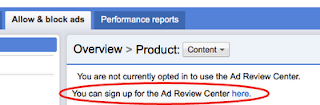
To use this feature, simply log into your AdSense account. Then go into the 'Allow and Block Ads' tab. There, you will see this feature, with an option to upload an image etc.

Limitations
Currently, you can only upload an image of maximum size 2 MB, and a max dimension of 1024 pixels. Also, this feature for now only returns image ads. More functionality will be added later on, and we'll keep you posted about it :)
We'd recommend you use this tool rarely, and with care. Only block content that you absolutely don't want to appear, because blocking ads is generally not a very good idea. It isn't a good revenue generating practice, and can reduce your revenue. So be careful! Good luck :)


If you don't want to get yourself into Serious Technical Trouble while editing your Blog Template then just sit back and relax and let us do the Job for you at a fairly reasonable cost. Submit your order details by Clicking Here »

Wow
ReplyDeletegood news thanks for sharing this :)
ReplyDeleteRegards
Rahul Kashyap
Blog: SDMMovies.com | Movies4u.US
Updation is very good with adsense
ReplyDeletelike it
Show HTML and Other Codes With Code Language Name
hmmm, it seems to be good
ReplyDeleteNice Tool Thanks for post...
ReplyDeleteIt’s my pleasure to read this blog post Search For Adsense Ads by Image using Ad Review Center Tool. Your blog post is very useful. I have been looking for this knowledge for many days. I think highly of you efforts. I will come here again to check new keep posts. Thanks.
ReplyDeletee-commerce dissertation topics