August 5, 2012

Widgets

5 Best Ways Bloggers Can Do Keyword Research


5 Best Ways Bloggers Can Do Keyword Research
Your online Money Making business highly depends upon your understanding about two things in particular, first being the most productive domain to start with, and next to it is an effective Keyword research. Keywords are the most powerful ingredient of your Search Engine Optimization which drives traffic to your site from the search results. However, attracting a considerable traffic to your site/blog is directly related to your knowledge about the keywords utility. This means that you need to think from your potential visitor’s point of view that what he might be looking for. Effective keyword research does not only drive traffic, in fact beside increasing your followers, it helps boosting your overall site statistics, while on the other hand, generating huge revenue.

Things to Take Care of

As the competition is increasing in every domain, your potential readers/clients/ followers might not know about your existence even. This means that they might not be searching your company on the search engines, in fact, they would look for the services that the domain you own, provides. Now if you are smart enough to show your expertise on SEO, mind it that your readers are not going to anywhere else.
Before we go on with the most useful tips, you need to discover some most common keywords for your niche by answering the following questions.
1. Keywords to Describe Your Site?
2. What’s Unique about your product/services?
3. What makes you better than competitors in your domain?
Once the Idea is clear with sufficient relevant keywords in hand, Now all you need learn is how to do a unique keyword research for your articles to make them SEO friendly each time.

1. Use Google product search

The first name that clicks when you need to search anything is obviously ‘Google’, so why not to start with it? Click on Google Products and enter the major key phrase in the search box. For example, if you are writing an article on London Olympics (the most happening these days), Just like, we have been writing on our Sister Blog, and you will see a drop down with lots of relevant phrases that you can consider your keywords and use them in your post.
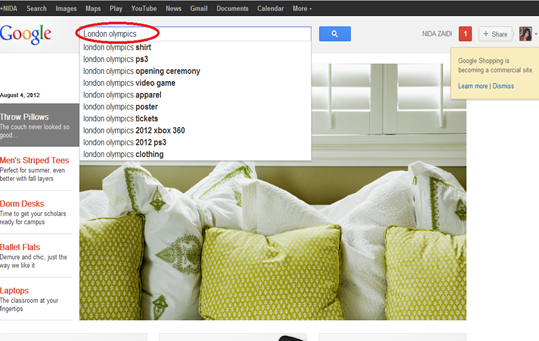
keyword research with Google product
Not only this, but you can also click on a particular, most suited phrase to know more about it and find out what is pre-written and what is attracting more traffic. Visitors who come to your blog with the following keywords are determined to know all about you are sharing, decreasing the bounce rate.

2. Use Shopping.com

Just following the same procedure that we shared in tip #1, go to Shopping.com and search for the same topic London Olympics. You will see new phrases appearing in the search, giving you new ideas, first of all, and secondly providing you with a list of keywords that you can include in your post and enjoy targeted visitors who want to search everything about London Olympics.
keyword research with shopping

3.Use Ebay.com

Ebay is yet another great platform when you are looking for worth adding keywords. Whether it’s a product or a service, Ebay is rich enough to hold a great variety on it. Repeat the similar activity that we did for the above two, and you will see all new keywords appearing.
keyword research with ebay

4. Try Amazon.com

Amazed with how easy it is to collect keywords for your post? If not, then try Amazon too. Although following the same procedure, the results are somehow much satisfactory. Enter your main keyword in the search box and you will see set of phrases, that can turn out be the most successful keywords of your post.
keyword research with amazon

5. yahoo product search

Just like Google Product Search, Yahoo is playing it safe with its product search engine, though not that effective as Google, still trying to survive. You can expect some Good keywords with this method too. With the scrolling arrows, you can always explore more phrases to choose best suited keywords for your post.
keyword research with ebay

Keyword research is a highly recommended tip to search about and use in your blogging career. Hope the following tips turn out to be useful enough to give you more relevant keywords for your articles.

All the Best


About Author:

Nida Zaidi loves exploring new ways to Make Money Online. She has always enjoyed making a living out of affiliate sales and through content writing. She is the co-author of all blogs under our network.

Follow her @Facebook


If you enjoyed this post and wish to be informed whenever a new post is published, then make sure you Subscribe to our regular Email Updates!

If you don't want to get yourself into Serious Technical Trouble while editing your Blog Template then just sit back and relax and let us do the Job for you at a fairly reasonable cost. Submit your order details by Clicking Here »

29 comments:

ahmed safwan on Aug 5, 2012, 12:15:00 AM said... #

Thanks for this great ideas.

Waiting for more from you.

Regards,
Ahmed Safwan
ToStartblogging.Com

Nida Zaidi on Aug 5, 2012, 12:26:00 AM said... #

As always, Safwan is the first one to comment :)
thanks buddy :) definitely!

Pramod sharma on Aug 5, 2012, 12:46:00 AM said... #

good info that is a best way to increase traffic mytechpromo.com

Bhavesh Pamecha on Aug 5, 2012, 1:44:00 AM said... #

Well I always hated doing keyword research. After I saw I was actually was getting some results by doing a research, I started using Google Keyword tool a few months ago. I think you have not included it as topic is mainly based for product research.
--
Add Flavor To Your Blog With Warning And Other Tooltips For Blogger

Nida Zaidi on Aug 5, 2012, 2:09:00 AM said... #

@ bhavesh bro
exactly brother, if you go through the post again, you will notice that i have been mentioning that these tips are unique :)
Google keyword is a typical must have thing !

Tanjid Hossain on Aug 5, 2012, 3:25:00 AM said... #

Hello friend. Your site helped me much from starting of my blog. But recently i face a serious problem. The problem is a web site is copying my blogs every post. Another serious matter is that it almost copy it in real time when i publish a new post. The truth is It automatically copy by content by RSS feed. So what i can do now. I do not what are the benefit of RSS feed. But if i turn it of the web site cant copy my content but i can't submit my sitemap on goggle. Please give me a suggestion what to do.

Sohaib Ilyas on Aug 5, 2012, 6:00:00 AM said... #

very great post I always love to read articles from this great site.

bloggingsentral on Aug 5, 2012, 8:22:00 AM said... #

A really appreciable post. Thanks for it;
Regards;
<a href="http://bloggingsentral.blogspot.com>Blogging Sentral</a>

Malathy Badri on Aug 5, 2012, 9:25:00 AM said... #

Wonderful ideas. I would add Google trends and place it at the top of this list.

Levis Raju on Aug 5, 2012, 9:45:00 AM said... #

Nice work Nida... Advance Ramzan wishes for you all... 8 Surprisingly Counterproductive Productivity Apps

Santu on Aug 5, 2012, 12:52:00 PM said... #

Thanks for the nice tips..But truly i am so lazy in doing keyword research while publishing new post on my blog.

Regards
www.gulmiresunga.com

Techno Tweaks on Aug 5, 2012, 12:59:00 PM said... #
This comment has been removed by a blog administrator.
Tanmay Kapse on Aug 5, 2012, 1:25:00 PM said... #

Awesome That was real cool :B

Pc Genie Land

Nida Zaidi on Aug 5, 2012, 1:39:00 PM said... #

Thank you so much for the appreciation :)

Nikhil Chavhan on Aug 5, 2012, 2:18:00 PM said... #

Nida SIster.
thank you for showing great ideas..!
good and Virally searched keywords can rank our websites high on Search engines!!
Thanks a Lot.
latest Mobile Partner for Huawei Dongles.

techgod8 on Aug 5, 2012, 3:19:00 PM said... #

Good Ieads Thanks Sister

John Xc on Aug 5, 2012, 7:06:00 PM said... #

Thanks for another awesome article. These resources will help find better keywords for my blog. Only problem is me remembering these method when actually writing the post (:lazy blogger:)
John's recent post: Blogger SEO all in one

Nida Zaidi on Aug 5, 2012, 9:46:00 PM said... #

Thank you buddies :)
@ John, try doing that forcefully, you will soon get used to of it :)

Hamxa Wasim on Aug 5, 2012, 9:50:00 PM said... #

Gr8 Post :D

iCloud for Windows XP

techtutshub.com on Aug 5, 2012, 10:07:00 PM said... #

Thanks for this great ideas.

Waiting for more from you.

How to Build Quick Backlinks for Your New Blog

What is Black Hat SEO web ranking? - SEO Tips

Thanks

Umer Rock on Aug 6, 2012, 2:35:00 AM said... #

This is one of the great post :)

teniyal garg on Aug 6, 2012, 1:59:00 PM said... #

Nice information in the post ..thanks a lot for this.

A--l--I AkBar on Aug 7, 2012, 11:31:00 PM said... #

Great post.....!1
i think.. Keyword research and using Highly Searched Keywords in our POsts in 2 to 4% density is the best Way to increase search rankings and SEO??
am i Right??
Convert your TV into an Android tablet

Internet Business Blogging (iBB) on Aug 15, 2012, 3:36:00 AM said... #

Nice post Nida.
Reasonable, instructive, convincing and persuasive.
Youtube search is another relevant but rarely used option by most bloggers.

iBB

Karan Kathuria on Aug 20, 2012, 4:10:00 PM said... #

Thanx for the post will be definately implementing them and will share the results soon.
tech2check.in

Kazi rabbi on Sep 19, 2012, 5:20:00 AM said... #

nice post nida. thanx
link wheel

Top 4 Sale on Oct 6, 2012, 9:27:00 PM said... #

Good tip! I will apply for my blog!
top4sale.net

Zahid Ali Raja on Oct 8, 2012, 6:30:00 PM said... #

great tips for beginner researchers thanks :)

myblogginglab.blogspot.com

blogspotinfo.com on Feb 22, 2013, 1:44:00 PM said... #

hi mohammad after reading your few posts i am changing entire meta tag including keywords ,descriptions and labels for blog.i used high paying keywords with high traffic volume and result is very few organis search results all i have is referral traffic.so i am rebuilding my blog with Niche low competition and high search voulme keywords.
I need your suggestions also that should i build a new blog or update the old one. i am actually confused now !

Click Here To add Comment

Confused? Feel free to ask

Your feedback is always appreciated. We will try to reply to your queries as soon as time allows.

Note:
1. To add HTML CODE in comments then please use our HTML Encoder
2. You can always Test the tutorial on our HTML Editor
3. No cheesy/spam Comments tolerated Spam comments will be deleted immediately upon our review.

Regards,
Mohammad

Support Us

If our Tutorials have helped you a little, then kindly spread our voice using the badge below:-

or try a Beautiful Banner


Widgets

 
  • MBT Icons and buttons

    Icons and Buttons

    Our resources have been successfully downloaded over 10K times and found almost every where. Get yours!

  • choosing webhost for a blog

    Why HostGator?

    Learn Why we chose HostGator as our Web Host and find discount coupons to kick start your blog today!

  • SEO Settings for blogger

    ALL IN ONE SEO PACK 2012

    Learn every single SEO tip that will boost your blog's ranking and organic traffic. We got them all!

  • Blogger widgets and plugins

    Visit MBT's Blogger LAB

    Why not take a tour of all great Blogger widgets published so far? You Name it we have it!

  • become a six figure blogger!

    Become a SIX FIGURE BLOGGER

    Learn what it takes to become a successful entrepreneur and build a living online!

About The Author

Hi! I am Mohammad, a certified SEO Consultant, Pro Blogger, Computer Engineer and an addicted Web Developer. Read More..

Recipes

SEO Affiliate Marketing Social Media

Make Money Online Web hosting

Blogging Tips Web Designing

Plugins and Widgets Blogging Ethics

Recent Comments

Popular Series

Powered by:

My Blogger Tricks © 2013. All Rights Reserved | Contact |
