
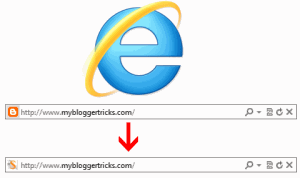

Even those who have purchased domains see that orange icon as the default favicon. Most of your might have observed that your custom favicon displays in both Firefox, chrome and other major browsers but you can not see favicon appearing in Internet explorer instead you see the same orange icon. Blogger also introduced a Favicon widget using which you can replace the default favicon with a logo image of your choice but unfortunately most of you are still confused on why you can not make the icon working in IE browser. In today's tutorial we will know what causes all the trouble and will successfully upload a favicon of our choice as your blog's brand logo.
How were Favicons previously used?
In blogger you would insert the following HTML code just below the opening <head> tag to make the icon appear:
<link rel="icon" href="LOGO Link in gif format" type="image/gif" />
or this:
<link href='LOGO link in .ico Format' rel='shortcut icon' type='image/x-icon'/>
By inserting the logo links you can easily make the icon appear on the address bar. But this method wont make the icon appear in IE because Internet Explorer always fetches the favicon from the root domain. For example in our case IE will look for the favicon at the following address:
3 Reasons Why IE doesn't accept the Icon?
- IE wont accept the icon if it is stored on your picasa album or in any other image hosting service or even if it is stored in any of your sub domains.
- It will also not accept the icon if its not stored in .ico format
- or if its size is greater than 16 X 16 pixels.
These are the three reasons that explain why your favicon does not show in Microsoft's browser and why IE conflicts in this case. Lets now fix this issue of no visibility and make things work just fine!
How To Upload Favicon Correctly in Blogger?
We will use the same widget that blogger provides but with correct requirements. Luckily the widget provided by blogger will automatically convert your logo into a .ico format even of its original format is gif or jpeg. So you don't need to worry in this case. Follow these steps
- Create a 16 X 16 pixels (or a square size ) logo icon for your blog either using Photoshop or any of the 30 Web tools we introduced.
- Note you must rename your icon anything other than favicon. In our case we named it fav. In order to force replace the default icon with yours you must save it with a different name else it wont display in any of the major browsers.
- Now go to Blogger > Layout > Page elements
- Click the edit link next to Favicon at the top-left corner
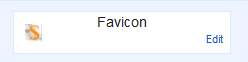
5. Confidently upload your logo using the browse button and hit Save
6. Clear your browser cache and visit your blog in both Firefox, Chrome and finally IE8+ to see a beautiful website icon just next to your domain inside the address bar!
Need help?
The steps are self explanatory and easily implementable. If incase you got yourself into a trouble just post your query and we would love to sort out your problem. I just hope with this IE fix, your free blogger blogs will get a whole new dressed up look. Happy blogging. Peace and blessings pals. :)


If you don't want to get yourself into Serious Technical Trouble while editing your Blog Template then just sit back and relax and let us do the Job for you at a fairly reasonable cost. Submit your order details by Clicking Here »
 Mohammad
5/25/2012
blogger tricks
,
Bugs and Errors
Mohammad
5/25/2012
blogger tricks
,
Bugs and Errors

This comment has been removed by the author.
ReplyDeleteVery useful. Thanks
ReplyDeleteGovt Jobs in india @ Employment News India
nyc info buddy. . .
ReplyDeleteBlogger Tricks
This comment has been removed by a blog administrator.
ReplyDeleteNo offense!!! But no one can write better that "Mohammad", for blogger.
ReplyDelete@santanu @vijay
ReplyDeleteGlad to see it working for both of you now :)
@Anumkar
Its not the written style that makes one high, the respect for others count more. You will surely get a chance to post at MBT just like others if you fulfill requirements and all I want from you is to understand how this beautiful medium works and to turn out the next face instead of presenting yourself the other way. So kindly give your best at things that will push you even higher brother.
@egyhacks
Thats your love buddy else of course anyone can replace me. :>
This comment has been removed by the author.
ReplyDeleteNice post Mohammad Bro
ReplyDeleteClassic Style Read More For Blogger
Wow fixed now!!
ReplyDeleteRegards
Pradee
Thanks for your nice tips. It will help lot of people. Great site. :) All the information are valuable. You have also great collection of Blogger Templates
ReplyDeleteBro, favicon got fixed but blog sometimes crashes when opened with IE. .:) lollz
ReplyDeleteDESIGN MASTER-An Official Template Release
I did that but sometimes firefox and explorer don't show my favicon and i still need to refresh it.
ReplyDeleteI am your avid reader, i hope you can visit my blog.
http://theyellowbulb.blogspot.com
Thanks Mohammad!
Got it fixed because of you :D
ReplyDeleteModern Web Social Icons For Free!
I am using IE11, and tt still didn't fix the problem.
ReplyDelete