

Create a Pinterest Account:
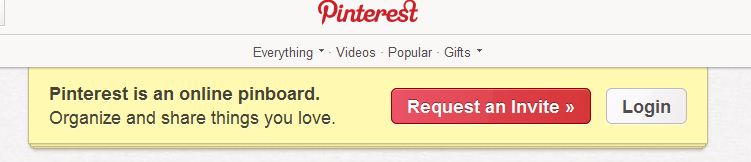
If you do not have any friends on pinterest, you can directly go to their official website and request for an invitation. You will be informed through an email that you are added in their waiting list .You will soon receive a notification email, welcoming you to pinterest. They will give you an invitation link; click on it. You will be brought to a new window and are then required to login with your Facebook account. Facebook timeline account works with pinterest, so if you have not updated your profile yet; you are required to do it now. A registration form is displayed asking your details. Fill it and your pinterest account is created.
Adding and editing pins:
Pinterest is all about ‘Pinning’, so let’s have a look how can we add a pin? Click on Add->Add a Pin. It will ask for web address. Enter url and the following window is displayed: 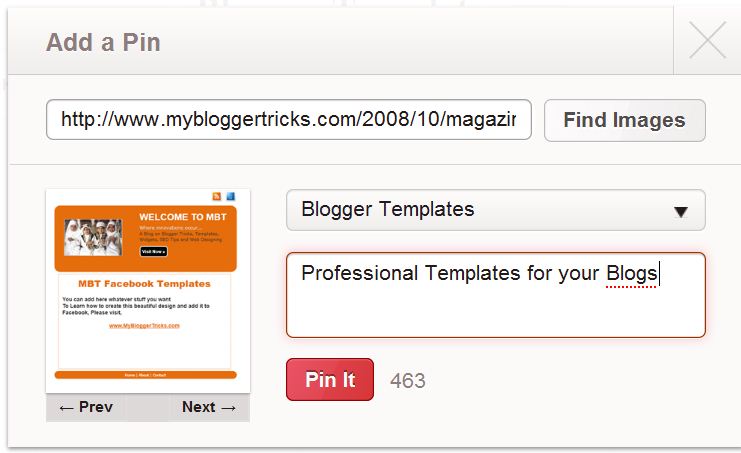
Select the category of your pin and add a brief keyword rich description for it. Select a proper display image according to your pin theme. You are supposed to enter the web address and it automatically finds images at that page. One thing is problematic here; it does not capture all the images but is selective. You can edit your pins by clicking on edit option. You can re-pin, like or comment at the pins.
Creating boards:
You will now wish to create boards, after all it is the online pin-board, remember? A board is simply a collection of pins belonging to same category.
To create a board, you need to follow the subsequent steps. Click on Add ->Create Board. It will display a dialogue box which will ask for Board Name. It will then ask to select the category. This category will display your content to others sharing the same category. Try to find the possible closest category.
You can then authorize who can pin at your boards. If you are promoting any community, you may prefer “Me + Contributors” but for a blog owner “Only Me” is a better choice to assure that you are displaying the right content.
Invite and find friends:
You have created your account…decorated it with alluring pins and pin boards; don’t you want to share them with your friends now? Of course, you want to do so…you want to socialize. What are you waiting then? Click on your name displayed at the top and select “Invite Friends”. You can enter email addresses of your contacts or can easily invite all of your Facebook and Google friends. Don’t know how? Click on “Find Friends” just below invite friends and your friend list is displayed. Send them an invitation and enjoy sharing!
Profile Settings:
You may need to change your profile settings. These profile settings will help you edit the following:
- General Information:
This includes the basic information like your first name, last name, user name, gender, location, email address, uploading image etc.
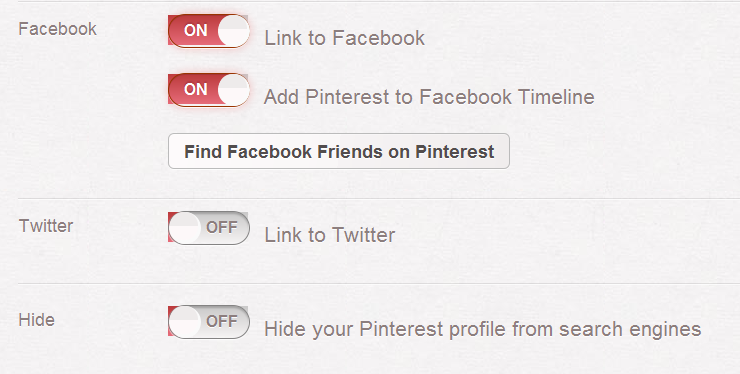
- Hide:
This allows you to hide or unhide your profiles from search engines. Turn it on for your blog profiles or if you want to show it public.
- Unlink accounts:
You can now unlink your accounts, if you wish to do so. Click on ‘ON’ or ‘OFF’ tabs to turn it off or on accordingly. Keeping all your accounts intact and linked will be a better choice.
- Notification Settings:
We would recommend checking these notification settings. It is a really nice option which gives freedom to change the way you are notified through email. You are notified when someone adds a pin, re-pin your content, likes your pin, comments on your pin or boards and follows you. But, the feature we like most is the frequency of these notifications. You can either get immediate updates or received it once daily. If you are not running a public blog you may prefer to have a weekly activity report. This report will help you analyze your progress with pinterest.
Save the settings.
What’s next?
We have tried to communicate things in the simplest way. If you still find anything confusing, feel free to ask your queries and we will respond. We will be sharing further tips and tricks soon. If you are finding any problem in adding and editing pins or creating boards, we strongly recommend you to read our post: Pinterest Basics
Did you added Pinterest Buttons to your blog yet? ?If not then grab a pinterest count button now!
Guest post by Rahmeen Ahmad Khan. She is MBT"s Gold Star Contributor


If you don't want to get yourself into Serious Technical Trouble while editing your Blog Template then just sit back and relax and let us do the Job for you at a fairly reasonable cost. Submit your order details by Clicking Here »
 Mohammad
4/14/2012
Guest Posts
,
Social Media
Mohammad
4/14/2012
Guest Posts
,
Social Media

Hmm...Nice post once again...This weeks its all about Pinterest....You Pin..With Our Truest..A Tagline from me hehe..as usual A master peace with awesome new touch... :) Syed Faizan Ali Recently Posted How To File A "DMCA Content Takedown Notice" - "Complain To DMCA"
ReplyDeletePinterest is becoming viral..... Facebook should fear about this .
ReplyDeletehttp://tracetricks.blogspot.in
Great info. Thanks for sharing it.
ReplyDelete@FAIZAN ALI
ReplyDeletefaizan bro i need that template which you are using can u plz provide me...
reagrds:Tayyab Nasir
Salam Mohammad. I've little problem in my blog. I want to change the title of the following page (Older Post Page) in my blog:
ReplyDeletehttp://freshtips.blogspot.com/search?updated-max=2012-01-04T10:49:00%2B05:00&max-results=6.
I hope you'll help me !
@TAYYAB NASIR
ReplyDeleteSorry i can't
I do apply for invitation on pinterest a week ago, but there's no 2nd email arrived. What should I do then?
ReplyDelete@Verdi Laurent
ReplyDeletetry request for an invitation again:
http://pinterest.com/landing/
or share with us your email address and we will send you invitation
we are sorry but due to lack of time we are unable to find the technical details for your problem but hopefully this solution will work for you
@Rahmeen Ahmad Khan
ReplyDeleteThanks for replying. I will do what you are suggesting. My email is v3rd1l4ur3nt(at)gmail(dot)com
Regards,
Verdi
@Verdi Laurent
ReplyDeleteinvitation sent laurent
@Rahmeen Ahmad Khan
ReplyDeleteThanks for your invitation. Now it's time to learn it more from your blog.
Thank you again.. ;-)
Best wishes,
Verdi
@Verdi Laurent
ReplyDeleteI'm really glad you wrote this article, I've been waiting for my invitation for 2 weeks now.
Can you please send me one:
ali(at)alaoui(dot)in
thanks a lot
@Ali Alaoui
ReplyDeleteinvitation sent ali.
Could you please sent me an invite? firoz.shk@gmail.com
ReplyDelete@Firoz Shaik
ReplyDeleteinvite sent.
I would also love to have an invite: redwyvern2@gmail.com
ReplyDeleteThanks!
@Dark Knight
ReplyDeleteinvite sent
@Dark Knight
ReplyDeleteinvite sent
could i please get an invite :)
ReplyDeletegeorgialwright@gmail.com
thanks
Nice tips!
ReplyDeleteWould you mind emailing me an invite? I've been waiting forever to hear back from them.
xhululu(at)gmail(dot)com
Thanks!
better not join them then:) they have no right to keep you waiting for so long
ReplyDeleteand i really dont mind inviting others
invite sent
nice tutorial
ReplyDeleteinternetricks4u.blogspot.com
Could I have an invite please? They haven't sent me one
ReplyDeleteClearly better(at)gmail(dot)com
Please send me invitation for pinterest on dejan.petrovic@daxt.com
ReplyDeleteI'd love an invite if it's not too much trouble.
ReplyDeletegpine4(at)gmail(dot)com
Could i pls get an invite it would help so much pashunitemindz@gmail.com
ReplyDeleteCould i pls get an invite it would help so much pashunitemindz@gmail.com
ReplyDeleteCan I please have an invite
ReplyDeleteSiobhandurkin_77@hotmail.co.uk
Thank you :)
invites sent to all. Sorry for late invitations ,i was unaware that you people were waiting for response.
ReplyDeleteCould I have an invite, please?
ReplyDeleteChrismcmorgado@gmail.com
Thanks in advance.
Can someone please send me an invite I would gladly appreciate it thanks(:
ReplyDeleteHernandez.cyndy(at)gmail(dot)com
pleaasse send me an invite.
ReplyDeleteanyushkadhawan@gmail.com