Build Online Store! | Penguin Panda Series - New! | 4 Rules To Make Money | SEO Settings | Facebook Popup 1, 2, 3 | Mashable 1 , 2


Wednesday, June 22, 2011

Most Viewed Posts Widget With Thumbnails by Blogger


Pin It

imageBlogger recently introduced there Most Viewed Widget which is also called Popular Posts widget. This gadget displays the posts which has the maximum number of pageviews in three ways i.e. All time, monthly or weekly. It is a great tool to engage your readers more and increase your page views. It will also help you know which of your posts leads the row.

Live Demo


Add The Popular Posts Widget To Your Blogs

  1. Go To Blogger > Design > Page Elements
  2. Click "Add a Gadget"
  3. Choose the Popular Posts Widget

popular posts

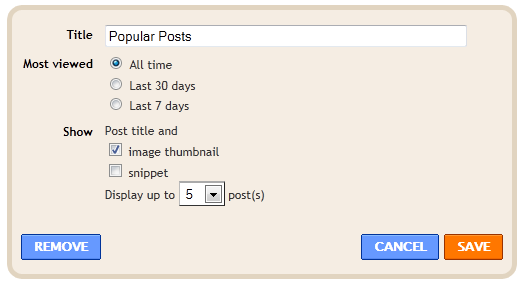
    4.  Set your settings in this way,

settings

  5.   Save your widget and you are done!

May be you will like these widgets too:


For thumbnails to appear make sure you always add an intro image of 100px by 100px at least in your post starting paragraph. The square size will give a more clearer picture. You can make the image as big as 300px by 300px.


If you enjoyed this post and wish to be informed whenever a new post is published, then make sure you Subscribe to our regular Email Updates!

If you don't want to get yourself into Serious Technical Trouble while editing your Blog Template then just sit back and relax and let us do the Job for you at a fairly reasonable cost. Submit your order details by Clicking Here »


Thanks for making this possible! Kindly Bookmark and Share it.
Technorati Digg This Stumble Facebook Twitter

7 comments:

Comment Page :
Dav7 on 7:44 PM, June 25, 2011 said... #

It looks great, nice to see new blogger native widgets, the ones that work simply great!

sadeeonline on 4:11 PM, July 18, 2011 said... #

this widget has installed still i cant see thumbnails sadeestyleblog.blogspot.com

Let's Eat Some Good Food on 1:19 PM, August 12, 2011 said... #

what im looking for is how to place these popular posts in a multi tab, i cant relocate it like that. how to? anyone?

Abu Farhan on 10:18 AM, August 22, 2011 said... #

I made this popular post with animation check out my blog

Dalena Vintage on 12:52 AM, November 13, 2011 said... #

I love this widget, but for some reason it's not aligned properly in the sidebar. It's hangs over the left side. I can't figure out what's going on! Any advice?

Cool Kid on 6:16 AM, November 25, 2011 said... #

Thanks....

Sk.chinsamuel on 5:02 PM, February 28, 2012 said... #

very usefull
Thank!

Confused? Feel free to ask

Your feedback is always appreciated. We will try to reply to your queries as soon as time allows.

Note:
1. To add HTML CODE in comments then please use our HTML Encoder
2. You can always Test the tutorial on our HTML Editor
3. Please do not spam Spam comments will be deleted immediately upon our review.

Regards,
Mohammad


Recent Posts

Join Me On Facebook

8600+ Followers

Join The Team!

Licensed Under CC

Recent Comments

Follow Me On Twitter

2601+ Followers

My Blogger Tricks (MBT) © 2012. All Rights Reserved | Contact |