December 27, 2010

Widgets

How to Create a Table Of Contents Page For Blogger?


The hosting server where I saved the JavaScript is down. So I have updated the Last code so please use the updated one.

Table-of-contents-for-bloggger You have seen that I have created an automatically updated table of contents page that shows the links to all posts published so far at this blog. This widget displays all your posts category wise and really saves time. I was previously adding new links manually to the Blogger Tricks page but as soon as I came to know of this great widget from Abu Farhan I instantly converted to it. This widget will also tell visitors that which posts are new and which are old. I have modified the CSS in order to make it suit your blog appearance.
Please first see a Demo Table Of Contents Page and play with the widget to see what is so exciting about it.

Follow the steps below to create a TOC page for your blog

  1. Go To Blogger > Design > Edit HTML
  2. Back up your template
  3. Search for ]]></b:skin>
  4. And just above it paste the CSS code below,
/*--------MBT TOC-----*/
.judul-label{
background-color:#E5ECF9;
font-weight:bold;
line-height:1.4em;
margin-bottom:5px;
overflow:hidden;
white-space:nowrap;
vertical-align: baseline;
margin: 0 2px;
outline: none;
cursor: pointer;
text-decoration: none;
font: 14px/100% Arial, Helvetica, sans-serif;
padding: .5em 2em .55em;
text-shadow: 0 1px 1px rgba(0,0,0,.3);
-webkit-border-radius: .5em;
-moz-border-radius: .5em;
border-radius: .5em;
-webkit-box-shadow: 0 1px 2px rgba(0,0,0,.2);
-moz-box-shadow: 1px 1px 4px #AAAAAA;
box-shadow: 0 1px 2px rgba(0,0,0,.2);
color: #e9e9e9;
border: 2px solid white !important;
background: #6e6e6e;
background: -webkit-gradient(linear, left top, left bottom, from(#888), to(#575757));
background: -moz-linear-gradient(top,  #888,  #575757);
filter:  progid:DXImageTransform.Microsoft.gradient(startColorstr='#888888', endColorstr='#575757');
}
.data-list{
line-height:1.5em;
margin-left:5px;
margin-right:5px;
padding-left:15px;
padding-right:5px;
white-space:nowrap;
text-align:left;
font-family:"Arial",sans-serif;
font-size:12px;
}
.list-ganjil{
background-color:#F6F6F6;
}
.headactive{
    color: #fef4e9;
    border: 2px solid white !important;
    background: #1C8DFF;
    background: -webkit-gradient(linear, left top, left bottom, from(#9dc2e7), to(#438cd2));
    background: -moz-linear-gradient(top,  #9dc2e7#438cd2);
    filter:  progid:DXImageTransform.Microsoft.gradient(startColorstr='#9dc2e7', endColorstr='#438cd2');
}
     5.   Save your template and now create a New Page (not a new Post).
     6.    Give Your new Page a relevant title like “XYZ Table Of Contents” and then in the EDIT HTML mode of your blogger editor paste the code below,
UPDATED CODE:

<script src="http://abu-farhan.com/script/acctoc/daftarisiv2-pack.js"></script>
<script src="http://www.mybloggertricks.com/feeds/posts/summary?max-results=1000&amp;alt=json-in-script&amp;callback=loadtoc"></script>
<script type="text/javascript">
var accToc=true;
</script>
<script src="http://abu-farhan.com/script/acctoc/accordion-pack.js" type="text/javascript"></script>

See a screenshot on how things will appear,
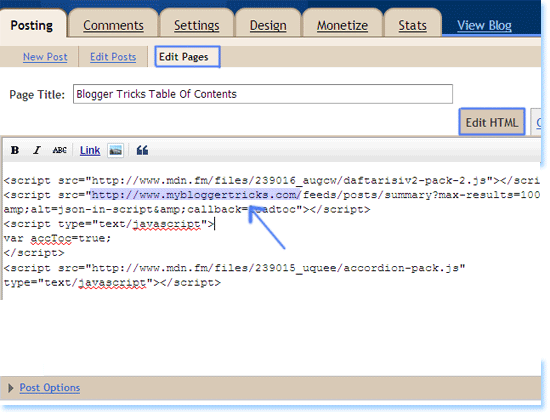
Table-of-contents
Now simply replace http://www.mybloggertricks.com with your Blog URL and hit save. View your new page to see a beautiful Table Of Contents with a nice drop down effect.

Customize The TOC widget

By default I have kept the Category background in active colour mode to appear as blue and inactive as dark gray as shown below,
Customize-TOC

If you want to change the colour of the Active mode then simple change #9dc2e7 and #438cd2 . Here #9dc2e7   refers to a lighter shade and #438cd2 refers to a darker shade colour. So whatever colour you wish to use simply replace #438cd2 with your prefered colour and #9dc2e7  with the lighter shade of your prefered colour.
You will find our Colour Generator Tool useful in deciding a colour selection.
That’s it!
I hope you will find it really useful. If you find anything unclear then feel free to ask for my assistance. Peace out! :)



If you enjoyed this post and wish to be informed whenever a new post is published, then make sure you Subscribe to our regular Email Updates!

If you don't want to get yourself into Serious Technical Trouble while editing your Blog Template then just sit back and relax and let us do the Job for you at a fairly reasonable cost. Submit your order details by Clicking Here »

128 comments:

TAP on Dec 27, 2010, 4:42:00 AM said... #

Nice trick Mustafa, have to take a look to this accordeon menu tomorrow, thanks for sharing this trick and welcome back

http://theasianpunter.blogspot.com

Vishal Srivastava on Dec 27, 2010, 9:49:00 AM said... #

Not showing on my template and i found thre is not style tag in this code

Hetal Patil Rawat on Dec 27, 2010, 9:55:00 AM said... #

Hello Mohammad,

I am quiet glad to know that you are back to pavilion! Really we missed you apart from your blogging tricks. Hope you had done well in your exams and i pray to Lord that you come up with flying colours.

This table of content is indeed a useful tool for readers. Can we have this widget in sidebar for easy navigation? If yes, do let me know if there is any deviation in its setting process with the one already present here.

Many thanks to you.

samsexy98 on Dec 27, 2010, 11:53:00 AM said... #

The Drop Down effect is not working for me..
And i needed to put the style tag in the code..
plz update..

internet marketing melbourne on Dec 27, 2010, 12:01:00 PM said... #

I think it will help a lot in saving time. I am going to try it to my own blog now.
Thanks for these tips!

Mohammad Mustafa Ahmedzai on Dec 27, 2010, 5:48:00 PM said... #

@Vishal

First try it with MBT HTML Editor. IF it works there perfectly then it must work in your template too. The code is tested and works just perfectly.

@Hetal Patil
Hey hi. Glad to see you back pal. And thank you so much for the greetings. Yeh the exams went just awesome and now the result too. Thanks :D
Hetal it can surely be added to sidebar but then due to long links the widget will look bulky and ugly. Are you sure you gona go with it? I will explain it then.

@samsexy
Sam did you tried it first in MBT Editor? Make sure you following steps correctly. And you know with your current template things are going the other way :P

@internet marketing
Oh you must! :)

samsexy98 on Dec 27, 2010, 6:11:00 PM said... #

Hey looks like some magic happened...

I first installed it on my Demo template for which I gave you the link and the drop down effect wasn't, so I commented here and kept as it is till your reply...

The moment you replied I checked it again and saw that it was working fine without any addition...

Haha...Isn't that a magic or a magic of your comment.. XD

My World4Free on Dec 27, 2010, 7:20:00 PM said... #

Its not showing all the post
I Have More Than 1000 posts but its not even showing 500 posts

I Tried changing

http://www.myworld4free.co.cc/feeds/posts/summary?max-results=1000&alt=json-in-script&callback=loadtoc
to
http://www.myworld4free.co.cc/feeds/posts/summary?max-results=2000&alt=json-in-script&callback=loadtoc

http://www.myworld4free.co.cc/p/var-acctoctrue.html

Plz tell me how to show all the posts

Lucky Flaush on Dec 28, 2010, 1:49:00 PM said... #

Hey!
I folloewd the steps you mentioned but nothing hapened. Oh, it hapened, but not what it meant to be. it shows only the posts but with each label on top of it.
See here please:
http://www.flstudiomusic.com/p/archive.html

Lucky Flaush on Dec 28, 2010, 1:50:00 PM said... #

Sorry! I removed the codes because it showed on top of my template all the codes...

Mohammad Mustafa Ahmedzai on Dec 28, 2010, 2:26:00 PM said... #

@Sam
Its all your hard work. Congratulation :a

@Lucky Flaush

Hey welcome back buddy! :a
Lucky I guess you are using IE right? If not then while creating blogger page choose it to appear as link only and not sidebar widget or bla.

Lucky Flaush on Dec 28, 2010, 3:13:00 PM said... #

Chrome and Opera... Mozilla crashed. But I guess it is a problem with my template, still I will try and try till will work.
Glad you're back and... little bit workaholic ;) Perfect!
I wish you to keep this style again and again, because we need your shots of inspiration.
Happy New Year!

samsexy98 on Dec 28, 2010, 5:56:00 PM said... #

@Mohammad
:h

nathasha said... #

thank you Mohd. working on my test. Nice job :q

Mohammad Mustafa Ahmedzai on Dec 28, 2010, 7:30:00 PM said... #

@Lucky


Thanks pal for the feedback. I surely will. :a And yeh Happy new Year to everyone in advance!

Woozgulf @ Fresh History Articles on Dec 28, 2010, 10:28:00 PM said... #

Here is a back to top script that will get larger on hover for your blog as a gift for your awesome tutorials:

https://sites.google.com/site/anims101/downloads/go_to_top.html?attredirects=0&d=1

Mohammad Mustafa Ahmedzai on Dec 28, 2010, 10:57:00 PM said... #

Thank you woozulf. I really liked it. I had previously used the same effect but to avoid an extra image I had to remove the larger one. But I will still keep the beautiful gift. God bless ya :)

samsexy98 on Dec 28, 2010, 11:39:00 PM said... #

Hey Mohammad I cannot find a tutorial relating to your following one:
http://www.mybloggertricks.com/2009/11/best-adsense-ad-locations-ad-formats-to.html

I have even commented there...

Poras Gupta on Dec 29, 2010, 5:51:00 AM said... #

I Think the CSS code that you have provided should be pasted above ]]>

Not Below.

Mohammad Mustafa Ahmedzai on Dec 29, 2010, 7:40:00 AM said... #

@sam

You can find thousands on other websites. Thats why I ignored writing on it. :p

@Poras

Thank you for spotting that. I just updated the post. thanks buddy.

samsexy98 on Dec 29, 2010, 9:32:00 AM said... #

@Mohammad
I know that but those are different then you bro...:)

Whenever I see a hack on your site I don't have to think much on backing up but when I see it another site I am pretty worried to apply that hack and also other sites do not respond much as you do when there comes a problem with code or something and as a result I don't even comment on other sites...

And now about the CSS code in this hack...
Even if you put the code after the ]]> it still works..
You just have to put the full CSS code into the style tag...

Thats what I did..;)

Thank You
Samsexy98

Mohammad Mustafa Ahmedzai on Dec 30, 2010, 10:04:00 PM said... #

@Sam
Oh that was a kind complement pal! :>

And yeh you are right if you enclose the code between style tags then it will surely work. Great that you did it by your own!

samsexy98 on Dec 31, 2010, 1:22:00 PM said... #

Hey Mohammad now as I see a new updated code I have tested to host the script on blogger itself and it just works fine...

I will mail you the details..

Thank You
Samsexy98

Mohammad Mustafa Ahmedzai on Dec 31, 2010, 3:24:00 PM said... #

@Oh I got you sam. Probably you have saved the large javascript chunk in your template instead. The javascript links. Thanks for reminding.

samsexy98 on Dec 31, 2010, 3:40:00 PM said... #

Yea you are right..
But once you are done you don't have to look at it again...

Is there any harm in doing that or any negative impact..

Please let me know..

Thank You
Samsexy98

Mohammad Mustafa Ahmedzai on Jan 1, 2011, 7:23:00 PM said... #

@Sam

Oh no it would work just awesome. It will even load fast and blog load time do also decrease. So great again! :)

samsexy98 on Jan 1, 2011, 7:45:00 PM said... #

@Mohammad
weeee yipeee yayyy... XD :D

iTechPlus on Jan 1, 2011, 9:32:00 PM said... #

Load 3 .js files. very heavy !

samsexy98 on Jan 3, 2011, 1:54:00 PM said... #

Hi Mohammad
There is one thing is this that I think is needed to be changed.

The long titles which do not fit the page doesn't go to the second line...

Is there any solution???

Thank You
Samsexy98

Mohammad Mustafa Ahmedzai on Jan 5, 2011, 4:22:00 AM said... #

@Sam

I think yeh its possible. We just need to add some CSS properties to our post bodies like position fixed and absolute. But the reason why I don't add it is, sometimes I have to add larger images to posts so I would not like post borders to squeeze the image. That's why I leave it open. Hope you understood me :)

samsexy98 on Jan 5, 2011, 9:42:00 AM said... #

@Mohammad
Wait a second...
Where did this image stuff came from..??

I am talking about this TOC and not blogger posts...

Will need to give you a Demo..
Go here http://www.plentyofebooks.net/p/table-of-contents.html and see the first category (.Net) and check the first title (.NET Book Zero)...
The title is not coming on the second line...

Hope now you understood me :)

Jeet Dholakia on Jan 7, 2011, 10:47:00 PM said... #

Hello Mohammad,
I loved our this post because it reduces so much of work and time also but in my "Table of Content" page the active and inactive color is not coming i.e Blue and Gray shade is not coming so please guide me.

Mohammad Mustafa Ahmedzai on Jan 7, 2011, 11:14:00 PM said... #

@samsexy

Yeh I said the same that the link will not appear in two lines because of the temnplate coding. Further the javascript itself needs to be edited but doing so made the code unworkable.

@Jeet
I am glad you liked it. Did you pasted the code in step#4?

samsexy98 on Jan 8, 2011, 7:25:00 AM said... #

@Mohammad
Well as far as I know there is no problem with my current template for that two lines because if I post a normal post with big title it comes in two lines...

May be the javascript will work in the near future..

Thank You
Samsexy98

xiaolin on Jan 22, 2011, 7:22:00 AM said... #

My blog have more than 1000 posts, i changed the number max=xxxx already but it still shows not all of the posts...

Ayush Chand on Jan 29, 2011, 12:04:00 PM said... #

I too got it from abu farhan! No other way! :(

Amit MB on Jan 31, 2011, 7:54:00 PM said... #

Hey ! Nice widget and a great tool but i am experiencing a difficulty. How can i group the posts like you have done on your site? I mean i also wanna differentiate a give labels like you do. I hope you understood my prob. Thanks in advance . . .

Mohammad Mustafa Ahmedzai on Jan 31, 2011, 10:02:00 PM said... #

@Sam

Bhavesh since it is javaScript I am blank in this regard. I know there must be a way but I tried but could not arrived at a solution. I just hope someone who knows Javascript may come to our rescue. :)

@xiaolin

I guess you have not categorised your posts. Have you?

@Amit
Buddy you will need to add labels to all your posts. Labels actually describe the categories in your blog. Once you have added labels to all posts then the respective posts will appear under each label/category.
Make sure you keep no more than 10 labels for your blog.

samsexy98 on Jan 31, 2011, 10:25:00 PM said... #

@Mohammad
Yea me to waiting for that guy..
I thought Abu Farhan know javascript..

And why not to keep more than 10 labels.
I have more than that..
Whats the problem..???

Amit MB on Feb 1, 2011, 7:34:00 AM said... #

Hey thamks. I fixed it !!! These many days i was giving different labels for each post. So that messed up my blog. Now i understand the importance of labels. Thank you ...

samsexy98 on Feb 1, 2011, 10:38:00 AM said... #

Hey Amit
I must say that your blog is really fast may be because of just two posts but maintain this in future after you start posting more content on your blog..

All the Best..:)

Ayush Chand on Feb 1, 2011, 10:14:00 PM said... #

I created a Table of content for my blog thinking that its good for SEO. But now i saw that its generated using java script. Search Engines can't see java script. So will the links in the TOC will get indexed?? Waiting for reply!!

Веселин Кисьов on Feb 17, 2011, 4:04:00 PM said... #

Hello Mohammad,
Nice idea to make this table of contents. I don't know why, but it did't work for me - just an empty page and a little message bellow about whose this badge is. I followed your instructions and tried several times. Nothing has helped. Could you help me? Thank you in advance! Vesselin

Mohammad Mustafa Ahmedzai on Feb 18, 2011, 1:56:00 AM said... #

@Amit

Oh kewl! Glad you did it correctly :)

@Sam
The smaller the categories the better you will organize your blog. Widgets can better display day. With limited categories you get better attention from search engines. Do specialize and work hard on selected labels and keep them small as I mentioned.

@Ayush
I would agree with it. You better create one static page too as I have done at Blogger Tricks

@Веселин Кисьов

You have not added labels buddy. Kindly add labels/categories to your posts. It will work then

Веселин Кисьов on Feb 18, 2011, 4:45:00 AM said... #

Thanks Mohammad! For the immediate and correct reply.

Ayush Chand on Feb 18, 2011, 4:10:00 PM said... #

@mohammed, how did you create it? By copy pasting?

RFT on Mar 31, 2011, 3:17:00 PM said... #

Thnx for this trick. Works excellent.

Jeet Dholakia on Apr 5, 2011, 4:04:00 PM said... #

Hey Mohammad,
my table of content is not displaying properly.its going left justified.suddenly this error is happening,i try to reinstall it but nothing is happening.

Adirondack real estate on Apr 9, 2011, 5:22:00 PM said... #

I truly wanted to compose a simple comment to be able to appreciate you for all of the magnificent ways you are writing at this website. My time intensive internet lookup has at the end been recognized with excellent content to talk about with my friends. I would admit that we readers actually are quite blessed to dwell in a really good community with very many perfect people with useful pointers. I feel really lucky to have discovered the webpage and look forward to many more cool times reading here. Thank you again for a lot of things.

Henry Jakson on Apr 9, 2011, 5:28:00 PM said... #

This is definitely a blog worth following. You’ve got a great deal to say about this subject, and so much knowledge. I think that you know how to make people listen to what you have to say, especially with an issue that’s so important. I’m glad to know this blog.
Business Plan

darkinvader10 on Apr 12, 2011, 7:22:00 PM said... #

you are amazing mohammad.this article really help me and save time. you are simply amazing..

Mohammad Mustafa Ahmedzai on Apr 14, 2011, 4:33:00 PM said... #

My pleasure. Thank you guys for all your love. @darkinvader10 You are welcomed brother. :>

kian on May 25, 2011, 12:40:00 PM said... #

I have use this kind TOC and having problem with it
1. won't appear on internet explorer
2. many of my post link not show with this TOC even i changed result to 9999
Thanks in advance for your kind help

regards
Kian

Http://pusatceritadewasaku.blogspot.com

Mohammad Mustafa Ahmedzai on May 25, 2011, 2:34:00 PM said... #

@kian

This widget is working just fine for me in all browsers and IE8. The only problem most people face with is un-organised labels/categories. Please make sure that you have few but relevant categories. Too many categories will make the wodget bulkier and long in length with no sense.

Please wait for my post on managing Blogger Categories/Labels. It will help a lot.

Max Ginez III on Jun 14, 2011, 12:36:00 PM said... #

This trick really works...
You can check it out on my website
http://catusersguide.blogspot.com/

Thanks a lot!

Sudhir Dudeja on Jun 29, 2011, 11:30:00 AM said... #

awasum bro working fineeeeeeeeeeeeeeeeeeeeeeeee

http://allmytutorials.blogspot.com/

Kang Onk on Jul 8, 2011, 12:40:00 AM said... #

Thanks...

محمد الدهيمي on Jul 27, 2011, 10:34:00 PM said... #

waaaaaaaaaaw
a very good appearance

BIPUL*guru on Jul 31, 2011, 11:52:00 AM said... #

Please help me ......my static page contents are not showing...means I've written so much but they r not displaying this matter is apart from above post......
...........

www.bipulguru.tk

தேவர்பிரான் கிருட்டினன் on Aug 5, 2011, 4:13:00 PM said... #

http://thamilarsamayam.blogspot.com/
pls have a look...
its not working for me too..!!

Manuel Garcia PH on Aug 23, 2011, 3:35:00 PM said... #

Any trick to not remention the link that was mentioned from other category?

Saif Ali on Aug 28, 2011, 3:15:00 PM said... #

Salam Mohammad, i wanna ask u that how to make some drop down taps?

plzz tell me !
U Can tell me on my email saif_hitman@hotmail.com

or u can also tell me here !!

Saif Ali on Aug 28, 2011, 3:33:00 PM said... #

it is giving " We were unable to save your template ,
Attribution widget is missing"

Help me what i have to do??

Manuel Garcia PH on Aug 31, 2011, 1:09:00 PM said... #

This is a very nice toc yet i have some inquiries. Is there any possibility to control what label will going to post ? some of my posts included in 2-30 labels and i want to minimize the repetition of posts in different labels. Thanks in advance.

Azeem_Daniyal on Sep 6, 2011, 10:35:00 AM said... #

Hi,
Salam Mohammad..
It's not working fro my blog.
Did everything but the page won't display any list at all..
my blog http:thelotf.blogspot.com..

plz..help..Wassalam..

DJ Ollie on Sep 26, 2011, 2:59:00 PM said... #

I've worked through the steps, but the page displays the contents page as text only. Not sure what i've done wrong, could you help me Mohammed? http://dietjustice.blogspot.com/p/contents_26.html

DJ Ollie on Sep 26, 2011, 3:09:00 PM said... #

Tried deleting and creating the page again. Still didnt work. Here is the new link; http://dietjustice.blogspot.com/p/contents_3950.html

[Deepak] on Oct 7, 2011, 5:39:00 PM said... #

it is unable 2 show all the post.......it is limited only to 1000 posts..plz help me

germz on Oct 9, 2011, 3:51:00 AM said... #

finally it worked. among the numerous codes i have tried, this is the only one which worked and is very easy to follow.

great thanks. you can take a look at it -> http://travelpremiere.blogspot.com/p/travel-premiere-blog-contents.html

Sagar Nargolkar on Oct 25, 2011, 7:12:00 PM said... #

Thank you for this awesome widget :)

Analyst on Oct 28, 2011, 9:14:00 AM said... #

Thanx, I have also implemented the same and example can be seen at http://www.indian-share-tips.com/p/indian-share-tipscom-table-of-contents.html
However I am experiencing one problem which is that like your e.g. the links are opening on grey button clicking whereas in my scenario all the links under grey buttons are already open from beginning. It means drop down effect is not working. Any via media to resolve this error, pl let me know.

Regards

Dena Jensen on Nov 19, 2011, 2:51:00 AM said... #

Dear Mohammad,
Thanks so much for this post and I love the Table of Content.
I just have a bit of problem and please remember you are talking to someone Internet Illiterate... I see my HTML Code on the top of the Blog and the Navigation bar has been lowered because of this. I put it in the Edit HTML should I have "added a gadget" then put it as a Java/HTML Gadget? I am waiting your reply. Thanks! Here is the problem: http://bettermarraigehappycouples.blogspot.com
Thanks again! I have to have a nice Menu and this looks like it will do the trick... But how do I add more topics??? I need about 8 of them... Many questions I know!So sorry!

Dena Jensen on Nov 19, 2011, 11:43:00 PM said... #

Mr Mohammed?
This is Dena Jensen again..
I have two problems and need your advise? Please?
So... I have done this about 20 times and it does the same thing... First, The codes show up on my webpage on the top and the second is that the next stop copying and pasting the codes HTML Edit in the Pages section for some reason the codes code up in my webpage... What the heck am I doing wrong? Can you please answer me when you have time? Thanks... You can email me too if that is more convenient for you. Also... Once it is fixed, how do I use it? Will I make a normal post and then just Label it and it will appear in the Table of Content? Thanks for your help

Oguntayo Mathew AdeKunle on Nov 21, 2011, 1:51:00 AM said... #

Hi, mr mohammad, i tried it but it's not showing on my blog, did i do anything wrong, here is my blog url, www.makeeasymoneyng.com
thanks and God bless

Farjeel on Nov 24, 2011, 3:27:00 AM said... #

Awesome Thannks..
http://www.cityofsms.blogspot.com

Admin on Dec 11, 2011, 10:11:00 AM said... #

this is not working for more than 500 posts and my blog has 5000 then what i have to do

Mohammad Mustafa Ahmedzai on Dec 11, 2011, 2:17:00 PM said... #

@Admin

Change this max-results=1000 to max-results=5000
:)

Mohammad Mustafa Ahmedzai on Dec 11, 2011, 2:22:00 PM said... #

@Dena
I am so sorry I read your comment just now. Humble apologies.
Well it will work perfect if added inside post. Please avoid adding it to widgets or inside the template. Further this widget works best if the number of your labels is less than 30. Larger than 30 will make the widget bulky and it will loose its sense. Keep your labels of blog as limited as possible for better navigation. Yes your labels will appear automatically in it.

Admin on Dec 13, 2011, 12:14:00 AM said... #

make a widget that only show posts of a specific lable

netsbook on Dec 13, 2011, 11:41:00 PM said... #

Thank you very much for your posts, this is very helpful in the design of my blog

LO S on Jan 2, 2012, 1:57:00 AM said... #

Thank you but This is not working for me no drop down.

LO S on Jan 2, 2012, 3:23:00 AM said... #

I fixed it, its working now thanks! :D

Penniless Teacher on Jan 4, 2012, 10:50:00 PM said... #

I've been trying this on my test site. The first time I open the page, the Table of Contents is collapsed. But when I go back to the page, all buttons are open and I can't close them.

The only item I changed in the code is replaced #9dc2e7 with #f49aaf.

http://pennilessteachertest2.blogspot.com/p/table-of-contents.html

I've been looking for something like this! Thanks!

Thanks for your help,
Penny

Adrian Aldan on Jan 10, 2012, 1:53:00 PM said... #

This is relly-relly helpfull i always learn from your blog thanks for sharing this stuff

aka rc on Jan 17, 2012, 6:02:00 AM said... #

Mohammad, Awesome hack. Unfortunately I am the case that proves your point re labels. With 3000 plus posts I know

1. I'm not catching all of them
2. I'm getting redundancies
3. I wish I had known about your labels caution 3000 posts ago.
http://www.bigbendbikersforfreedom.com/p/table-of-contents.html

Question, do you think with time this will capture posts it is currently missing or is what you see what you get.

Thanks for what you are doing guy, wish I would have ran into you ages ago, aka rc

Admin on Jan 27, 2012, 1:38:00 AM said... #

man will it work for 7000 posts

Hasni on Feb 2, 2012, 10:23:00 AM said... #

Salam.......THis is not working on my blog I need your help when i follow the process it is only showing heading Table of Contents not showing anything else

Tanveer Ahmed on Feb 3, 2012, 1:47:00 AM said... #

asalamwalkeum bro.. thanks for beautiful site..

it's not working for post more than 500... :((..

Ebookz Download on Feb 10, 2012, 5:36:00 PM said... #

Your blog is just like a source. Just created it.
Thanks you so much.
ebookzdownloadz.blogspot.com

Techno Tweaks on Feb 10, 2012, 7:23:00 PM said... #

I LUV U !!!!!!!!!!!!!!!!!!!!!!!!!!!!!!!!!!!!!!!!!!!!!!!!!!!!!!! BEST SITE IN UNIVERSE!!!!!!!!!!!!!!!!!!!!!!!!!!!!!!!!!!

Techno Tweaks on Feb 10, 2012, 7:24:00 PM said... #

please visit technotweaker.blogspot.com for exiciting technology tweaks!

shafiq mujahid on Feb 28, 2012, 8:36:00 AM said... #

nice info.. ^_^

sebin thomas on Mar 2, 2012, 4:40:00 PM said... #

Thanks man for this wonderful post, Can i arrange the contents manually???

Shahid Iquebal on Mar 2, 2012, 6:35:00 PM said... #

hiiiiiii.....thanx for this stunning widget.

but on my blog its not working properly.Always showing static table of contents,,,,,i wish it to be in active and inactive from but its not working.plz help.
plz take a look at my page: http://www.pharmafriend.in/p/e-book-catalouge.html

thanx again for this.

Amber Schofield on Mar 15, 2012, 1:33:00 AM said... #

Ok, so I have three blogs that use this (and I LOVED this by the way). Anyway, it disappeared on all three blogs today! Help!

http://theboxofcrayons.blogspot.com/p/table-of-contents.html
http://therecipecrayonbox.blogspot.com/p/recipes-by-category.html
http://lifescrayonz.blogspot.com/p/table-of-contentsindex.html

Getahun Amare on Mar 18, 2012, 4:06:00 PM said... #

really cool. God bless u Mohammed.

Ken-zoo on Mar 19, 2012, 6:04:00 PM said... #

This does not work on my blog .. but I will try again .. maybe you want to help. please see the http://ken-zoo.blogspot.com .. I still need a lot of improvement ..

नरेश जागरिया on Mar 23, 2012, 11:26:00 PM said... #

Hi,

Thanks for the great widget friend. Just have a small query. I have tried this widget in a sidebar instead of a page and its working fine. But I just wanted to know if it is possible to arrange all the labels horizontally instead of vertically (like the top bar menu and posts list inside those labels will be displayed after click or mousehover?)

Regards,
Naresh

The Blogger on Apr 6, 2012, 11:02:00 PM said... #

when I enter that script on my site and then I visit my site a notice page comes up from Google saying malaware on http://abu-farhan.com/

ADMIN on May 1, 2012, 5:56:00 PM said... #

OMG haha im so so happy thanks for this widget here http://pspskull.blogspot.com

StarKissed on May 6, 2012, 11:20:00 PM said... #

Thanks Mohammad, I changed the font size in the list, and tab colors. I have a little problem if you ever come back to this page.

The " overflow:hidden " doesn't hide the overlap of text at the right side margin. Some of my titles are longer than the white box area. There's too many overlapping to go back and change my titles.

I don't know why this is happening. I double checked w3schools.com and I can't see anything else I can do to fix it. It may have happened when I enlarged the font size, but I had to, although that much text shouldn't be sticking out just going up one size in the font.

If you want to take a look: http://www.DocumentaryMagic.com/p/list-of-all-documentaries.html

You will see most of the problems starting with the 3rd label, "Ancient History."

Thanks, otherwise it looks great and it's the closest I've been able to find that I like. Blogger sometimes has too many limitations. Thank goodness I found your hack!

Asrama betiong yogya on May 8, 2012, 9:50:00 PM said... #

tahnks for mybloggertricks.com...

Levis Raju on May 13, 2012, 8:46:00 PM said... #

Thanks Mustafa.....

www.netinfozblog.in

Wasim Memon on May 23, 2012, 6:54:00 PM said... #

its not working on my blog androidblaze.blogspot.in.
now what to do???

συντάκτη on Jun 12, 2012, 12:05:00 AM said... #

hello!
can i use specific labels, instead of all the posts?
i want use this, with 2 or 3 specific labels.
it is possible?
i made certain trials..but nothing!
your site is amazing!
sory for my eanglish.

συντάκτη on Jun 12, 2012, 12:07:00 AM said... #

english... :) :) :)

Jimmy Cylene on Jun 15, 2012, 6:08:00 PM said... #

haha it's from indonesian blog script, Judul-label meaning: label-title....

Boalemo Moslem Center on Jun 22, 2012, 9:32:00 PM said... #

Nice Info

yourcyberguide.com on Jun 29, 2012, 12:36:00 PM said... #

Your tricks really work...i was wondering how to make the email subscriptions on feedburner to monthly instead of after every post you publish

93blogger.com on Jul 1, 2012, 1:19:00 AM said... #

Hi Bro.. I have tested it with firefox, opera and IE.
In firefox, every thing goes well, but there are some problem when I browse them using opera and IE. please check here: http://mylabroom.blogspot.com/
When I click to open any category, it do not stay open and again get closed.
Waiting for your reply!
Thank you!

Danang Widiyanto on Jul 27, 2012, 10:29:00 AM said... #

Hi, I tried this trick but to no avail, is it because I subscribe to feedburner so the following link error http://www.ncfci.co.cc/feeds/posts/default?alt=rss?

Tharaka Devinda on Jul 31, 2012, 9:18:00 PM said... #

how Do I remove powered By Letters (Link)

Elangovan Palaniappan on Aug 12, 2012, 5:13:00 AM said... #

Thanks bro...It is working

Oguntayo Mathew Adekunle on Aug 17, 2012, 11:45:00 PM said... #

this looks so awesome on my blog, i can i say thank you for all the wonderful works you are doing here, keep it up. weldone.

Ashish Singh on Aug 24, 2012, 5:01:00 PM said... #

Nice post!
Thanks for Sharing it. Earlier I was searching for a sitemap but this is much better.

Thanks again.

Ashish
Website Booster!

Zulqurnain jutt on Aug 24, 2012, 8:37:00 PM said... #

I know its too old post to you to reply but mohammad yar ,,i cant be of specific category posts on a single page with thumbnails?? ,, It would be great!!

regards,
H4ck3r Cracks

Syed Hafeez Ahmed Shah on Oct 17, 2012, 9:43:00 PM said... #

very nice tutorial,I have done easily.It is working perfect.
You can check it here,
http://freeearncorner.blogspot.com/p/blog-page.html

Συντάκτης. on Oct 17, 2012, 10:34:00 PM said... #

@Jimmy Cylene
Thanks for your reply Jimmy!

Christianto Chen on Oct 23, 2012, 7:12:00 AM said... #

It's Working Perfectly on my blog
I love it hahaha
Thanks !!

Regards,
Loneon

Renata on Oct 31, 2012, 6:13:00 PM said... #

Can't thank you enough, I had been looking for a solution to table of contents for a long time. Works perfectly! Looks amazing!

Gul Ahmed on Nov 18, 2012, 3:35:00 PM said... #

Dear, Why Adding Table of Content is neccessary will it boost our PR ? or what?

Great Post.
Earn Money Online

Admin on Jan 10, 2013, 3:02:00 AM said... #

drop down not working?
wat to do?

iliyas shaikh on Jan 10, 2013, 11:07:00 AM said... #

assalamu alaykum
dear the great brother mohammad also mybloggertrick staff
great thanks
i lots of pray to allah ..realy great
i lots of learn of your website now i level web deginning so nice thank you

see my blog

http://shayri-ki-duniya.blogspot.in/

Ghulam Mhuhddeen on Feb 5, 2013, 4:13:00 AM said... #

internet download manager free download Thanks dude, nice Post .good admin Thnaxxx

Abhay Chauhan on Feb 8, 2013, 4:31:00 PM said... #

Dear Friend,

I have added the code as per your instructions. It is working fine except one problem I am facing. It is not updating once I post a new post.
Please help.

Hari kesh on Feb 25, 2013, 12:30:00 PM said... #

Can anyone tell me how to show TOC only for a particular label.

Rosalinda Ursery on Apr 9, 2013, 2:33:00 AM said... #

Your blog is extremely informative. Individual, which an individual highlighted previously mentioned, is really informative. Thanks for sharing this information with us. It is incredibly useful for anybody to training. Best connected with luck for future years blog articles.
Click Here

senthur stocks on May 16, 2013, 12:57:00 PM said... #

This site is nice and very useful information!!
To design web sites or making blogs here many information is there.
When I Try to Design my blog Free Mcx Tips , Free Stock Tips I found this Site!!! Really very excellent!!!
Thanks,
By Mcx Tips , Stock Tips

Click Here To add Comment

Confused? Feel free to ask

Your feedback is always appreciated. We will try to reply to your queries as soon as time allows.

Note:
1. To add HTML CODE in comments then please use our HTML Encoder
2. You can always Test the tutorial on our HTML Editor
3. No cheesy/spam Comments tolerated Spam comments will be deleted immediately upon our review.

Regards,
Mohammad

Support Us

If our Tutorials have helped you a little, then kindly spread our voice using the badge below:-

or try a Beautiful Banner


Widgets

 
  • MBT Icons and buttons

    Icons and Buttons

    Our resources have been successfully downloaded over 10K times and found almost every where. Get yours!

  • choosing webhost for a blog

    Why HostGator?

    Learn Why we chose HostGator as our Web Host and find discount coupons to kick start your blog today!

  • SEO Settings for blogger

    ALL IN ONE SEO PACK 2012

    Learn every single SEO tip that will boost your blog's ranking and organic traffic. We got them all!

  • Blogger widgets and plugins

    Visit MBT's Blogger LAB

    Why not take a tour of all great Blogger widgets published so far? You Name it we have it!

  • become a six figure blogger!

    Become a SIX FIGURE BLOGGER

    Learn what it takes to become a successful entrepreneur and build a living online!

About The Author

Hi! I am Mohammad, a certified SEO Consultant, Pro Blogger, Computer Engineer and an addicted Web Developer. Read More..

Recipes

SEO Affiliate Marketing Social Media

Make Money Online Web hosting

Blogging Tips Web Designing

Plugins and Widgets Blogging Ethics

Recent Comments

Popular Series

Powered by:

My Blogger Tricks © 2013. All Rights Reserved | Contact |