

FeedBurner is a widely-used email subscription service, and unless you're on a premium service such as Aweber, chances are that you are using FeedBurner as well. For some, FeedBurner might be everything they need. But for more advanced bloggers out there, some premium services seem to offer a lot more features. And the fact that FeedBurner ran into problems a couple or so months ago doesn't go very well in its favor either. Whatever the case though, it is always a good idea to back things up. Whether you want to move your subscribers to another service, or you just want to make a backup, you will need to download your FeedBurner subscriber list. Here, we'll tell you how to backup your FeedBurner Email Subscribers list.
FeedBurner isn't so renowned with reason. It has many features to offer, such as subscription management, email branding, customizable delivery and communication preferences, and a lot more. You can view and sort your subscriber list, activate/deactivate and delete individual emails, and receive emails when people unsubscribe. Besides, it has the export option, so you can export your list to excel or .csv format.
Downloading your FeedBurner email subscribers
To start off, log into your FeedBurner account. FeedBurner previously had problems displaying subscriber counts, but it seems to be all right for most people now. Just click on the blog name for which you want to backup your subscriber list.
You will then be directed to a dashboard. Click on the Publicize tab in your dashboard.
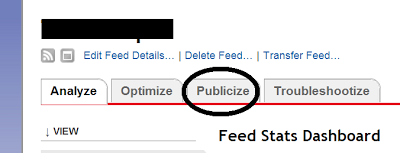
Under the publicize tab, you will see an option for Email Subscriptions in the left sidebar. Once you click it, you will see some further options. Now click on Subscription Management.

Now, you can see the number of your email subscribers. When you first log into FeedBurner, what you see is the total number of your subscribers for both email and RSS combined. But what you need is just your email subscribers' list, and not RSS subscribers' list. On the Subscription Management page, if you scroll down all the way to the bottom, you will see the number of your Total Subscribers, which only counts your email subscribers.
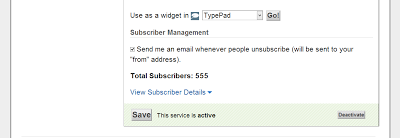
If you click on the View Subscriber Details option (shown in the picture above), you will options to export the list.

Just click on Export: CSV, and you're done! You will be prompted to save a file, which contains all your email subscribers. You can do whatever with this file; either store it on your computer, or upload it to a cloud storage, your call.
In the meantime, if you have questions, feel free to ask. Good luck :)


If you don't want to get yourself into Serious Technical Trouble while editing your Blog Template then just sit back and relax and let us do the Job for you at a fairly reasonable cost. Submit your order details by Clicking Here »

Very nice tutorial
ReplyDeleteAtif Imran
This comment has been removed by the author.
ReplyDeleteThanks for this all information, I want to save all my subscribers' email addresses.
ReplyDeleteMUHAMMAD HASNAIN
SCIENCE Pakistan
Thaanks Yaaar It helped meeee......
ReplyDeleteElectronic Circuits and Project Ideas
Thanks for this help. I want to know that if i change feedburner address, will I loose my subscriber.
ReplyDeleteGet Reply Of Your CommentsAnd Get Click Of Your Links In Comment
Thanks for the valuable advice. I have also heard that google is planning to shut it down. They 've also closed feedburner's official blog, so it is really a good idea to be prepared for whatever happens.
ReplyDeletethanks for sharing for this tutorial. I have to need :)
ReplyDeleteRegards
Rahul Kashyap
Blog: SDMMovies.com
Nice.. Thank you for this...
ReplyDeleteCan we import the email list of our feed burner users to some other service like Aweber or feedblitz without any hassles or again do the people need to activate in order to get updates?
ReplyDelete@Memory Guru Deepak yes that's true, which is why now is a good time to back things up
ReplyDelete@Vijesh C you can do it without hassle. We will try to make a post on this topic to make things clear, so stay tuned :)
ReplyDeleteThis comment has been removed by the author.
ReplyDeleteNice tool and very nice info
ReplyDeleteViral Gags
Thanks for sharing this nice tutorial....
ReplyDeletevisit:mywebtution.com
Sir Help me: sir main nay apnay blog per 'MONOP' template install ki to dosray din organic web traffic kam hogai, pehlay 3000 tak daily visit hota tha ab sirf 100 say 150 tak hotay hain ,ab main kia karon sir help me mera blog yeh hay http://mytopfreeware.blogspot.com/ - 771 pages index hain lekin web trafic buhat kam ho gae hain
ReplyDeleteThanks For Awesome Article! I really in search of this for my website HiFiFun.Com All Kind of Tips and Tricks!
ReplyDeleteHow can I remove a subscriber from feed burner feed? My recent post- Best Start Menu For Windows
ReplyDeleteWell written tutorial :)
ReplyDeleteGgaan Masoun
Nice tutorial. Thanks for sharing :)
ReplyDeleteRegards
Blogging Tips & Tricks
well said, now we need not to worry about our feed burner subscribers.
ReplyDeleteHow to recover your blog from Google Panda update Penalty
Thank you so much for this important post.
ReplyDeleteHriday
Hi Qasim and Mohammed,
ReplyDeletemillions of thanks to you guys for this blog and the very well explained tips and tricks.your articles have been very helpful to me. my food blog is an year old now and has reached half a million hits and the credit goes to you guys. i have implemented most of the seos from this site and has truly worked out for me. once again Thanks a tons. i have a problem now. hope that will be resolved with your help. i had moved from blogger blog to a google hosted custom domain 6 months ago. 3 months ago, by mistake i had created a new blog feed (instead of editing the already existing one). so my domain has 2 feeds now and my 500+ subscribers are distributed in these 2 feeds.so my blog has 2 feeds (both for blogposts and none for comments). is this going to be bad for seos? is google going to penalize for having 2 feeds. after the google updates in 2013 feb, i have lost keyword rankings for the major traffic driving keywords, though my PR for the site remains unaffected. also i have recently changed the design of the existing template (only the design and not the template). please help me. would appreciate if you could let me know where i went wrong. Thanks a lot.
http://www.indianhealthyrecipes.com/
This comment has been removed by the author.
ReplyDeleteYou can sound like Rocket Arabic you ARE a native Arabic Rocket Arabic Review speaker when you use Rocket Record, the pronunciation tool from Buy Rocket Arabic!
ReplyDeleteRocket Record learn arabic online allows you to listen to the way native speakers say hundreds of best way to learn arabic words and phrases. Then you can record yourself and accurately compare your speech with that of the native speaker how to learn arabic.