
Gmail is a favorite email service for many, especially since it offers so many cool features and services. Indeed, it was the service that accelerated development in this industry by posing a serious threat to the existing leaders, Hotmail and Yahoo. What with Google's Drive integration along with other services, it has almost become the leading email service. Most people open their browsers to check on their emails on Gmail. But there's a simpler way! The Gmail Notifier for Windows is an easy solution that lets you receive emails right on your desktop without opening up your browser!
Not only is this a handy option to get email alerts when you are doing something else, say watching a movie or playing a game, this feature is also a haven for those who use multiple Google Accounts. I, for one, do. My primarily used Google account is based on a Hotmail email address, so I get a headache whenever i need to check my Gmail. I can't do it without having to type in many passwords again. Hence, for people like me, this is a simple solution for checking out their email and quickly replying or composing a new email through it.
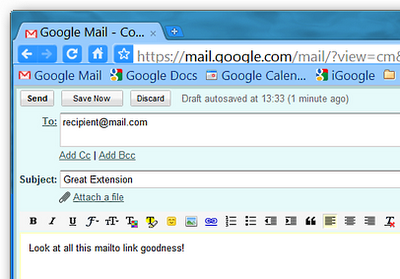
Another advantage of using this small utility is, it will become your default mailto program. Hence, you won't need to configure a larger and more complex application, such as Microsoft outlook, to be able to send emails when clicking on email links. So when you click on links with a 'mailto' attribute, a Gmail 'compose' window will open.
Setting up
Setting up is easy. Simply download the software from the site (link given above) and install it. It's a very small utility, and will install in no time at all. Run the installer, and you will see two options to select; Run on start-up and Use for outgoing mail. The Run on start-up option will auto-start the Gmail notifier whenever Windows starts, and the Use for outgoing mail will activate Gmail notifier to open a compose window whenever you click no a 'mailto' link. You probably want to check both the options before proceeding.

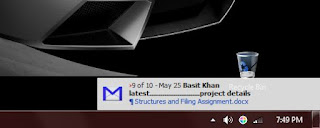
After installing, you will be prompted for your Google Account email and password. Once authenticated, you will start receiving all your notifications on the bottom-right corner of your screen.
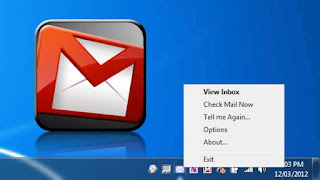
Right-click on the Gmail icon from the system tray, and you will see a bunch of options. From there, you can View your email Inbox or Check email now to refresh notifications. There's also an option 'Tell me again', which runs the notifications again one more time. 'Options' will take you to another screen, where you can set your default browser and enable/disable mailto links.
There is a known issue with Gmail notifier. It sometimes gives a connection error as a result of it trying to use HTTPS secure encryption. The utility wasn't designed for this kind of thing, but you can fix the problem by downloading a patch. Extract the .zip file, and close the Gmail notifier. Then, open the notifier_https.reg file and then confirm. Start the notifier again, and hopefully you will see no problems.
That was a known issue. if you are encountering any other problem, or have any questions, feel free to ask. We're here to help :)


If you don't want to get yourself into Serious Technical Trouble while editing your Blog Template then just sit back and relax and let us do the Job for you at a fairly reasonable cost. Submit your order details by Clicking Here »

Hi
ReplyDeleteI can still experience some bugs in Gmail Notifier...
Thanks
Niyas
Recent post
How To Upgrade Your Hotmail Email Address to @outlook.com
Thanks for the info.
ReplyDeletenice post dude i already use this
ReplyDeleteThank's keep posting
nice trick dude
ReplyDeletethanks
ReplyDeleteWell, Gmail Notifier is an awesome way to connecting ourselves through Gmail while doing other works on PC.
ReplyDeleteMy recent post:- Top 10 Free Easiest Way To Increase Your Facebook Fan Page Fans
very informative post as usual keep it up i apply this method and really time saving thanks
ReplyDeleteRagards
smartincomeguide.com
Ya Gmail Notifier is an awesome tool to save our time
ReplyDeleteHow to Make Your Pc System Run Faster
ReplyDeleteThanks mate ! But 1 question what if i am offline and i receive a mail , will i be notified of it ?
MyBloggerTricks.com like Text Higlighter for your Blog
http://www.yourpcgenie.blogspot.in/2012/09/mybloggertrickscom-like-text-higlighter.html
Thanks for sharing this article, Learn jQuery here.
ReplyDeleteThanks Qasim Zeb!
ReplyDeleteGood info thanks
ReplyDelete