July 24, 2012

Widgets

Create A Branded Username For Google Plus URL


Create your own Google Plus brand username
Google Plus is a very popular social media, and is especially useful for bloggers and webmasters, who not only have to catch traffic from the social media itself, but also adopt it so easily use and integrate with other Google services, such as Blogger, Google AdSense, Google Webmaster Tools, and so on. Google Plus is great in many respects. But it has one very obvious flaw, something which even newcomers to the network notice as well. Google Plus does not have personalized usernames in profile URLs. For example, for profiles or pages, you can't have a URL like plus.google.com/name, as you can on Facebook and Twitter. What you have instead is plus.google.com/1234567890 etc. There is a workaround for this, and you can create a brand username for your Google Plus Page or Profile URL!
Google Plus Profiles currently contain a long string on numbers, which are not easy to memorize. And so, unlike Facebook or Twitter, if someone asks you for your Google Plus profile link, you can't easily direct them verbally. You first have to open up your Google Plus profile, copy its URL, and then send it to someone via chat or email. This is very time- and effort-consuming. And if you're away and you need to give someone your profile link verbally or via message, the best you can do is tell them to look you up, hope there aren't very many people with the same name as yours, and trust that they'll find you.

All this involves much hassle. But you can get rid of it simply by using a great web app called GPlus!

What is GPlus?

GPlus is basically a URL shortening service for Google Plus. With it, you can get a personalized username for your profile in the form gplus.to/username. Note that this is a URL shortening service, which means it won't change your actual username on Google Plus. It will just provide you a redirect link, so when you enter gplus.to/username in your address bar, it won't directly open your profile. Rather, it will redirect you to your Google Plus profile.

GPlus

Customizing Google Plus Profile URLs

1. You need to fetch your Google Plus Profile ID first. Log into your Google Plus account, and click on the down arrow next to your profile image in the top-right region of your screen. Now click on View Profile. Now, you can see the ID in your address bar. (See the image below. The highlighted numbers make up the ID). Select your ID and copy it.
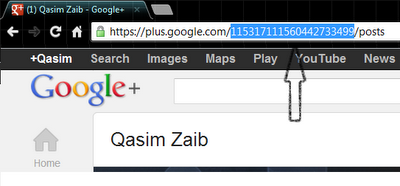
Google Plus ID
2. Take this ID, and go to GPlus. In the Nickname, type in the username you want to use. Now paste your ID in the ID field, and click on Add. Be sure to type in only your ID numbers, and not any slashes (/) or any other part of your profile URL. Usernames can only be between 3-25 characters.
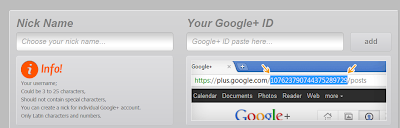
custom GPlus URL

Once you click on Add, GPlus will show you whether all is okay or not. And that's it! Now you can type gplus.to/username into your address bar, and you will arrive at your own Google Plus profile!

Customizing Google Plus Page URLs

The process for customizing page URL is the same as for profiles. But there's a slight difference. Google Plus Page URLs are somewhat different than profiles.

Customize Google Plus Page URL

Notice how page URLs are slightly different than profile URLs. But you just have to go for the string of numbers between the slashes.

Claim your username now!

This is a really great service which has been started recently. And already, millions of profiles and pages have been added to it. Claim your own username now before someone else scoops it up!

Hope you like this post. Your feedback would be highly appreciated. Peace and blessings :)


About Author:

Qasim Zaib is a passionate blogger who enjoys writing articles on Technology, Make Money Online and Blogging niche. He is our Gold Star Contributor and co-author of all blogs under our network.

Follow him @ Twitter | Facebook


If you enjoyed this post and wish to be informed whenever a new post is published, then make sure you Subscribe to our regular Email Updates!

If you don't want to get yourself into Serious Technical Trouble while editing your Blog Template then just sit back and relax and let us do the Job for you at a fairly reasonable cost. Submit your order details by Clicking Here »

25 comments:

azad hussain on Jul 24, 2012, 2:21:00 AM said... #

Awesome post bro.. Whr frm u get those information bro?
Regards
Azad
www.azadfunclub.com

Imed Adel on Jul 24, 2012, 3:14:00 AM said... #

شكرا جزيلا

John Xc on Jul 24, 2012, 5:34:00 AM said... #
This comment has been removed by the author.
teniyal garg on Jul 24, 2012, 7:26:00 AM said... #

It's really a good trick to remember my g+ profile url.........
thank you so much for this post.

Pramod sharma on Jul 24, 2012, 7:40:00 AM said... #

Good info bro otherwise it is not possible to rember g + profile url
My Tech Promo

Vijay Prakash on Jul 24, 2012, 8:01:00 AM said... #

Very nice dude, this was totally unknown to me..

Blogger Tricks And Widgets

technovary.com on Jul 24, 2012, 8:08:00 AM said... #

I think now a day this blog have not any original/unique articles.. this all things are already found via google search...

waiting for new unique articles

Masroor Aijaz on Jul 24, 2012, 11:26:00 AM said... #

Thanks for this awesome post Qasim bhai.. I have also set-up my own Google PLus username gplus.to/jxgreat.

http://www.salmanfanclub.org

Vera Angelina on Jul 24, 2012, 12:21:00 PM said... #

Nice info,,
http://all-jss3.blogspot.com

Tanisha sayyad on Jul 24, 2012, 12:26:00 PM said... #

Gr8..Very Fresh News Thanks for sharing

AKHIL ABRAHAM on Jul 24, 2012, 12:51:00 PM said... #

Nice post .....u r really awesome..


Akhil Abraham
blog:GLOB INFO TECH.com

zaldi7 on Jul 24, 2012, 1:18:00 PM said... #

nice info ,, i really like your idea .. thx

Cute Parents on Jul 24, 2012, 1:27:00 PM said... #

Nice post and thanks a lot for sharing..

My add gplus.to/cuteparents

thanks and regards
sam

Sohaib Ilyas on Jul 24, 2012, 1:28:00 PM said... #

it is not started recently lol... btw thnx for the info brother keep it up.
Extreme Tech Blog

Rabindra Sankar Das on Jul 24, 2012, 1:36:00 PM said... #

An useful post for me Mr Quasim Zaib...i am a novice but i cud implement it...however cud not understand how to customise google+ page url

take this opportunity to wish u and ur family a happy Ramadan

Fareed Arshad on Jul 24, 2012, 3:02:00 PM said... #

Another great tip on MBT :) Now every should definitely join Google+!

Ayush Agrawal on Jul 24, 2012, 5:59:00 PM said... #

It is there for a long time bro....

howdoblog.com on Jul 24, 2012, 6:26:00 PM said... #

very nice information thanks sharing this :)
howdoblog.com

Rekha on Jul 24, 2012, 7:42:00 PM said... #
This comment has been removed by the author.
Madhans on Jul 24, 2012, 7:43:00 PM said... #

hello sir.. i need ur help. i have applied google adsense and got partial approval and they said to add blank ads in my website. I want to know how many blank ads should i add to my website.. please please reply me.

upwebhosting on Jul 25, 2012, 9:51:00 AM said... #

Really wonderful offer for web hosting services users.
Liberty reserve hosting

Yahia.Bouhlel[Backdoor] on Jul 25, 2012, 9:29:00 PM said... #

Thanks for the good writeup
It in fact used it
http://pspgamiing.blogspot.com/

Hamxa Wasim on Aug 2, 2012, 8:22:00 PM said... #

I am using it :P
Nice Post Dude!

Free iPhone

sharethesepictures on Aug 4, 2012, 2:24:00 PM said... #

Wow. Thanks for this nice post

Darko on Aug 8, 2012, 3:50:00 AM said... #

It doesn't working at me. It says "This nickname is used by someone else" and when I try to open this "https://plus.google.com/nickname" it gives me 404 page or page not found. Any idea?

Click Here To add Comment

Confused? Feel free to ask

Your feedback is always appreciated. We will try to reply to your queries as soon as time allows.

Note:
1. To add HTML CODE in comments then please use our HTML Encoder
2. You can always Test the tutorial on our HTML Editor
3. No cheesy/spam Comments tolerated Spam comments will be deleted immediately upon our review.

Regards,
Mohammad

Support Us

If our Tutorials have helped you a little, then kindly spread our voice using the badge below:-

or try a Beautiful Banner


Widgets

 
  • MBT Icons and buttons

    Icons and Buttons

    Our resources have been successfully downloaded over 10K times and found almost every where. Get yours!

  • choosing webhost for a blog

    Why HostGator?

    Learn Why we chose HostGator as our Web Host and find discount coupons to kick start your blog today!

  • SEO Settings for blogger

    ALL IN ONE SEO PACK 2012

    Learn every single SEO tip that will boost your blog's ranking and organic traffic. We got them all!

  • Blogger widgets and plugins

    Visit MBT's Blogger LAB

    Why not take a tour of all great Blogger widgets published so far? You Name it we have it!

  • become a six figure blogger!

    Become a SIX FIGURE BLOGGER

    Learn what it takes to become a successful entrepreneur and build a living online!

About The Author

Hi! I am Mohammad, a certified SEO Consultant, Pro Blogger, Computer Engineer and an addicted Web Developer. Read More..

Recipes

SEO Affiliate Marketing Social Media

Make Money Online Web hosting

Blogging Tips Web Designing

Plugins and Widgets Blogging Ethics

Recent Comments

Popular Series

Powered by:

My Blogger Tricks © 2013. All Rights Reserved | Contact |
