
Google Drive, as you might know, is one of the more recent cloud storage services. For starters, it offers some functionality that makes it better than its closest competitors, i.e. SkyDrive and DropBox. One such feature is the seamless integration with other Google products, and the story doesn't end there. Google Drive will also let you host static web content, so that you can run a simple website right on your drive! This sort of functionality was only offered by DropBox before. Now, it's Google's turn to establish its superiority. In this post, we'll talk about hosting your own web content on Google Drive.
Cloud storage is a great way to host web pages. For one, it lets web developers get a feel of how their websites would actually look on the web. Besides, it could be used to share photos, videos, and other information with friends and family, without fear of people from the outside hacking into your system, or spamming your website etc. It is also a great way for freelancers to show their work to their clients.
Hosting web content on Google Drive
Now you can't host dynamic websites on Google Drive. Nothing that requires server-end computing. Technologies like PHP, ASP etc require back-end processing, so they can't run. You can only host simple, static websites that are HTML, CSS, and JavaScript driven.
Now you could use this just like you'd use GooglePages or code.google.com for a similar purpose. But GooglePages has been replaces with Google Sites, and no longer supports direct uploading, which is kind of a let-down, because we need to directly upload webpages in order to test them on Google Drive. Google Code, on the other hand, has bandwidth issues. Hence, Google Drive is the best option you have for hosting your static website.
How to host a website on Google Drive?
To host a website on your Drive, log into your Google Drive account from a web browser, and create a folder. This folder can be inside the main Google Drive folder, or inside another private directory. The path isn't of concern. What's important is the permission you set on that directory. This directory will host your web files, so it needs to be shared with the public, or else, no one will be able to see it.
Now that you've created a folder to hos your files, it's time to put the files in. Upload all your web files in this folder. Now, you need to share it with the public. To do this, right click on the folder, and then click on Share >> Share.....

Now, look under the "Who has access" section, and change the setting from Private to "Public on the web". Then, copy the link given on top. You'll need it for the next step.
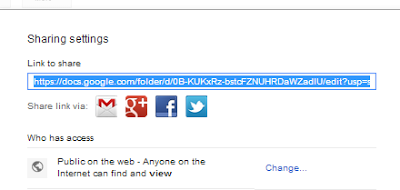
Now, you need to get your hosting link. You can do this manually. The URL you just copied is the link to your shared file, and not to the hosting. There's a slight adjustment you need to make in the URL. The link you copied will go something like this: https://docs.google.com/folder/d/link-to-your-site. You have to change it to https://googledrive.com/host/link-to-your-site. Notice that the 'link-to-your-site' part remains the same.
Now, you can give this link to whoever you like! It'll take them to your hosted website. Cool, right? You can see Google's instructions on hosting a website on Google Drive. And believe it or not, they've hosted the instructions on Google Drive itself! You can view the instructions here. You can use any JavaScript files on your own site.
Hope you enjoyed this post. Try this out with your own Drive, and let us know if you have any problems. Peace :)


If you don't want to get yourself into Serious Technical Trouble while editing your Blog Template then just sit back and relax and let us do the Job for you at a fairly reasonable cost. Submit your order details by Clicking Here »

Hey Qasim, this is again a great post by you. As I already commented on your previous post, that I love Google drive most in compare to skydrive because of its services and the facilities they provide.
ReplyDeleteAgain a wonderful post from you qasim, I am glad I found this blog....... I tried google drive once but I left using it, I actually didn't understand anything, I will start using it again...
ReplyDeletegreat post share mate. really helpful blogs.
ReplyDeleteWhat a surprise! I was thinking about the same and you provide us the details to host the webpages on GDrive.
ReplyDeletePlease publish an article to set-up these G-Drive's websites to custom domains, as the URL's of these are not easy to remember.
Thanks for the article!
nice post
ReplyDeleteget more job updates here |www. fresherjobspot. blogspot. com |
(remove spaces)
Hope google plans to start free web hosting service with this.. :p
ReplyDeleteAdd support for php, custom domain and database... that should make google drive a basic web hosting platform...
super like .........
ReplyDeletecontestmatra.com
Awesome as usual! No words for Qasim! :D
ReplyDeleteThis is another great post from MBT team. Thanks for sharing this with us.
ReplyDeleteMohammad sir, your footer's drop down first menu is not working properly.
ReplyDeleteWhen I clicked 'Web Hosting Guide' and clicked on 'Why Choose Hostgator' then it opened third dropdown menu, not post. Please check. :)
Thank you so much for this post, Qasim! Drive supports JavaScript and other client-side scripting languages, so it's even possible to run a JavaScript Drive app directly from Drive. :)
ReplyDeleteThis comment has been removed by the author.
ReplyDeleteAgain a wonderful post from you qasim, I am glad I found this blog.
ReplyDeleteNice info about hosting for bloggers and it is advaned google trick too.We expect more articles like this from my blogger network.
ReplyDeletenice post .........
ReplyDeleteVery Helping me,tank you for this..
ReplyDeletevery helpful one for me...Good to have this kind of articles from you ...:)
ReplyDeleteSEO question: are websites hosted on GDrive normally ranked in Google Search Engine?
ReplyDeleteVery helpful article...it helps me..:)
ReplyDelete