September 5, 2012

Widgets

Enable 2-Step Verification to Secure your DropBox account


Dropbox 2-step verification - advanced security

If you have been following news from the cloud industry, you might be familiar with the recent exploits at Dropbox. The cloud storage giant faced some inconvenience at the hands of some hackers who got into the service. Ever since, they have tightened the loopholes and implemented some security measures. But despite all efforts, the safety of user data still largely lies in the hands of users, since that's where a hacker seeking sensitive information will strike. It would perhaps be best to enable 2-step verification for your Dropbox account, so as to prevent un-authorized access to your sensitive and private information.


From personal experience, I can vouch for how easy it is for your important to fall into the wrong hands. Anyone who gets access to your computer automatically has access to your Dropbox account. And your online account isn't impregnable to hacking methods either. But in many cases, users get their accounts violated as a result of carelessness.

Now with the 2-step verification, such inconveniences can be avoided. Dropbox's 2-step verification works just like Google's providing users with an extra security layer that can keep out most unauthorized activities.
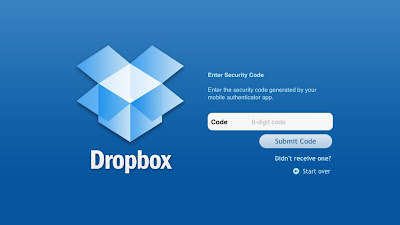
Dropbox security

Enable Dropbox 2-step verification

It works just like Google's or Facebook's 2-step verification. Once you log into your account with your email and password, Dropbox sends a text message to your mobile number. This text included a 6-digit verification code which you can then enter to log onto your Dropbox account. You won't be able to log on if you don't have this code.

Additionally, Dropbox gives you the option of installing the Authenticator app on your smartphone, which generates time-sensitive codes right on your phone which can then be used to log in.
  • To enable this two-level security, simply visit your Dropbox account security page. Scroll down to the bottom for the Account Sign-in section, and you'll see the Two-step verification option there. Change it if it's disabled.
enable two-way security
  • Now you can just follow the simple wizard which will guide you through the process. You can link your phone (smartphone with Authenticator app) or your phone number which will receive confirmation codes for log in.
Note: You will also be provided with an emergency code. Keep it safe, and don't share it with anyone. This is for when you lose your mobile phone, and can't access the codes sent by Dropbox.

  • Visit the security page once more, and review all your linked devices. Un-link all devices, and re-link them. If you don't use a device any longer, then don't re-link it. Otherwise, ever if you currently use a device, un-link it and then re-link it. That way, all these devices will now be set to require a 6-digit code before a successful login. If a new computer or device is used, you will be notified by email as well.
  • Finally, update your Dropbox on your devices to the latest version to ensure support for 2-step verification.

That's it! Your Dropbox is now much more secure! Now upload to the cloud without any worries! And if you have any confusion, feel free to ask!


About Author:

Qasim Zaib is a passionate blogger who enjoys writing articles on Technology, Make Money Online and Blogging niche. He is our Gold Star Contributor and co-author of all blogs under our network.

Follow him @ Twitter | Facebook


If you enjoyed this post and wish to be informed whenever a new post is published, then make sure you Subscribe to our regular Email Updates!

If you don't want to get yourself into Serious Technical Trouble while editing your Blog Template then just sit back and relax and let us do the Job for you at a fairly reasonable cost. Submit your order details by Clicking Here »

13 comments:

Bhavesh Pamecha on Sep 5, 2012, 12:17:00 AM said... #

Great to see other services are also looking to start with 2-step verification. It is indeed a much more secure system.
--
Top Blogging Ideas

Debarpan Mukherjee on Sep 5, 2012, 12:18:00 AM said... #
This comment has been removed by the author.
Debarpan Mukherjee on Sep 5, 2012, 12:21:00 AM said... #

nice article,sir I have send a message regarding my blog to MBT,looking forward to hear from you.

jalil haider on Sep 5, 2012, 12:32:00 AM said... #

useful information bro as usual keep it up. You are not writing on smartearningmethods?????

regards
smartincomeguide.com

Janmejaya Mohanty on Sep 5, 2012, 6:50:00 AM said... #

Great post brother. Drop box is the best store, where we can store our files. Thanks for the great post.

Visit: Premium Blogging Tips.

Konika Chauhan on Sep 5, 2012, 8:18:00 AM said... #

awesome article,,,,thanks for sharing this post..

teniyal garg on Sep 5, 2012, 2:34:00 PM said... #

Nice information..thanks for the post.
http://topphotosblog.blogspot.in/2012/09/rare-photos-from-india-monuments-of.html

bloggingsentral on Sep 5, 2012, 5:32:00 PM said... #

Nice Post

Guppu Boss on Sep 5, 2012, 11:56:00 PM said... #

DropBox free account sucks :/ G drive is better Internetdreamz | free style tech blog

Prakash Hari Sharma on Sep 6, 2012, 5:55:00 PM said... #

Thanks for sharing this article, Learn HTML5 here.

worldwebsurfers.com on Oct 26, 2012, 5:15:00 AM said... #

I got here on my search for blogger extra security, Admin sirs please I'd be glad if you write about Blogger extra security.

worldwebsurfers.com on Oct 26, 2012, 5:20:00 AM said... #

I got here on my search for extra Blogger security. Admin sirs, I'd be glad if you write about how to make a blogger account more secure. Thanks

Gaurav Sharma on Dec 27, 2012, 6:32:00 PM said... #

Its a terrific post mohammad, i beliieve that you are the best blogger of pakistan.
This service is like Google 2-step verification.
Keep it up.
Best spy software

Click Here To add Comment

Confused? Feel free to ask

Your feedback is always appreciated. We will try to reply to your queries as soon as time allows.

Note:
1. To add HTML CODE in comments then please use our HTML Encoder
2. You can always Test the tutorial on our HTML Editor
3. No cheesy/spam Comments tolerated Spam comments will be deleted immediately upon our review.

Regards,
Mohammad

Support Us

If our Tutorials have helped you a little, then kindly spread our voice using the badge below:-

or try a Beautiful Banner


Widgets

 
  • MBT Icons and buttons

    Icons and Buttons

    Our resources have been successfully downloaded over 10K times and found almost every where. Get yours!

  • choosing webhost for a blog

    Why HostGator?

    Learn Why we chose HostGator as our Web Host and find discount coupons to kick start your blog today!

  • SEO Settings for blogger

    ALL IN ONE SEO PACK 2012

    Learn every single SEO tip that will boost your blog's ranking and organic traffic. We got them all!

  • Blogger widgets and plugins

    Visit MBT's Blogger LAB

    Why not take a tour of all great Blogger widgets published so far? You Name it we have it!

  • become a six figure blogger!

    Become a SIX FIGURE BLOGGER

    Learn what it takes to become a successful entrepreneur and build a living online!

About The Author

Hi! I am Mohammad, a certified SEO Consultant, Pro Blogger, Computer Engineer and an addicted Web Developer. Read More..

Recipes

SEO Affiliate Marketing Social Media

Make Money Online Web hosting

Blogging Tips Web Designing

Plugins and Widgets Blogging Ethics

Recent Comments

Popular Series

Powered by:

My Blogger Tricks © 2013. All Rights Reserved | Contact |