
Uncertainties are those added ingredients of life which are really unwanted but are obviously true, isn’t it? Sometimes they might cause you to pay huge. Think about a scenario where an important E-mail sent by you to a client doesn’t get delivers to him. If you are a Freelancer, you can imagine what it can cost you if your mail doesn’t reaches to its destination due to any reason whatsoever. In Professional dealings, what really matters is-accuracy in terms of delivery time. To make it clearer, consider a situation where you are asked to deliver the task at 00:00 sharp.
You switched on your machine ten minutes before, logged in to your account, attached the sample, and sent it. there are two bitter uncertainties expected, firstly, all the process stated above might consume more than ten minutes and your delivery gets late, Mind you that each minute matters in business. Secondly, there is an equal probability that your mail doesn't reaches the destination due to any error (connection error, network error, etc). After making the need clear, Think about scheduling your important mails to ensure accuracy in delivery time, at the same time, getting notified the moment your client opens up your mail. How amazing that would be?The idea is not new, so isn’t the need! Understanding the need, Microsoft outlook offer the option of sending a “received notification” from the receiver, but again, the idea was totally left on the receiver’s disposal. Having been inspired by the notifications send by 123greetings, I have been waiting for a similar feature since a long time, where the sender gets notified when the receiver opens the mail; and again, its Google which has facilitated the thirst of its users by ensuring an easy way to ensure that the mail has been delivered and seen by the receiver. All you need to have is a Gmail account.
If you are a consistent Gmail user, you must be wondering why you never come across this ‘really-must-avail’ option. The reason behind is, you need to install an additional Chrome browser Extension, known as RighInbox. This extension allows you to send scheduled mails as well as allows you to track your E-mail to know when it gets opened at the receiver end.
1. Install the Extension and There You Go!
Unlike other extensions needed for other browsers, Rightinbox is an easy to find and easy to use extension. All you have to do is to click on the link and install.

2. Re-open or refresh the page
Once you install the extension, you are required to open your Gmail account or refresh it if it was already opened. You will see a pop up screen, notifying about the new extension working. Click Continue.

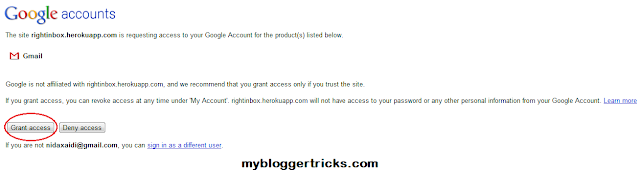
3. Grant Access
The next you will see on your screen, will be a page where you get to know about the privacy policies and you will be asked whether to grant access or not, click on Grant access and move on.
4. Enjoy the best Added Features!
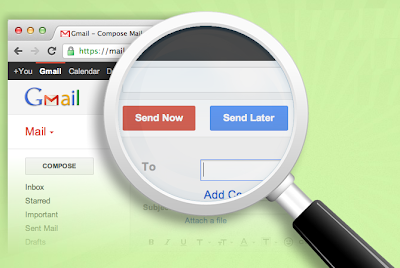
You are almost done! It’s time now to utilize it. Go to compose mail and the following page will appear:

You can now send the mails later by scheduling them. This is a perfect blessing for those who forgot to wish their loved ones on special occasions. Sit once with a diary or a sibling who knows special dates. Schedule your mails and become reliable!
As you can see, the check box with the Track option needed to be checked in order to get the mail been tracked till the time the receiver does not opens it.
That was all for now, hoping that the tutorial turns out useful to you. Do Share your views about this feature.
Best wishes


If you don't want to get yourself into Serious Technical Trouble while editing your Blog Template then just sit back and relax and let us do the Job for you at a fairly reasonable cost. Submit your order details by Clicking Here »
 Nida Zaidi
7/02/2012
Email Marketing
,
Google
Nida Zaidi
7/02/2012
Email Marketing
,
Google

Good Post I know This First time
ReplyDeletethanks Nida
Hey Nice To See you Here On MBT, Hows your Experience. Any ways nice article to get started, we hope you will have nice time here. Syed Faizan Ali Recently Posted Force Users To Like Facebook Page If They Want To Download a File on Blogger
ReplyDelete@Syed Faizan Ali... Mohammed and Nida are friends.. So she can join MBT whenever she wants.....
ReplyDeleteNice post Nida.....
Google Plus Had Started The Events New !
@Nida
ReplyDeletehey nice to see you here. So are you back?How was your tour?
thanks
ReplyDeleteThank you So much Guys for such a warm welcome. I really hope that i keep you all entertained here as i have been doing on SEM.
ReplyDelete@ Levis Raju and Faizan buddy,
ReplyDeleteSEM and MBT are Siblings and that itself keeps all the authors connected :)
Thank you :)
@ Rahmeen,
ReplyDeleteYes buddy, i landed back last Wednesday, the tour is always a great one when destination is that Place :)
Hi Nida, I've tried this tool today. But i couldn't find, how do i track whether he opened my mail or not? Explain me in this regard pls...
ReplyDeleteAwesome Post nida
ReplyDeleteMy Cyber Tricks-Earn Money
Simply Nice
ReplyDeleteMy Cyber Tricks-Earn Money
Thanks Nida ji see my blog How To Blogr and tell mehow to improve it
ReplyDelete